
SharePoint for Law Firms: 7 Mistakes That Kill Adoption (and How PageLightPrime Fixes Them)
Key Takeaways
- SharePoint can be an excellent document management platform for law firms—but only when it is designed for legal workflows.
- Poor information architecture, weak governance, and inconsistent permissions are the biggest reasons SharePoint projects fail.
- Microsoft 365 provides the security, compliance, and collaboration tools law firms need, but success depends on proper implementation.
- PageLightPrime transforms SharePoint into a legal-ready document management system with client matter workspaces, governance, compliance automation, billing, trust accounting, and Microsoft Copilot integration.
Written by Knowledge Team, posted on August 04, 2026

Is SharePoint Good for Law Firms?
Yes—when implemented correctly.
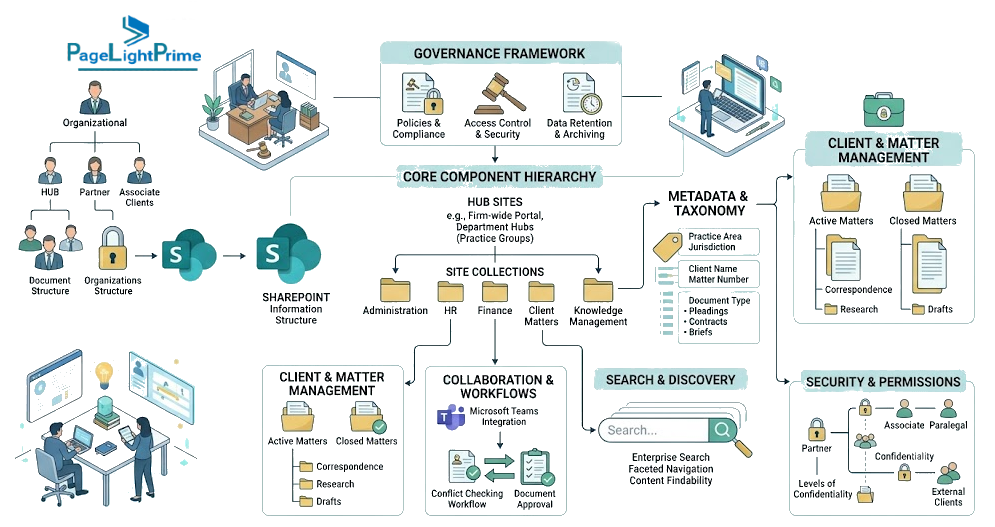
Microsoft SharePoint has become one of the most widely adopted document management platforms for professional services organizations. For law firms already using Microsoft 365, it offers secure document storage, version control, collaboration through Microsoft Teams, enterprise search, Microsoft Purview compliance capabilities, and native integration with Microsoft Copilot.
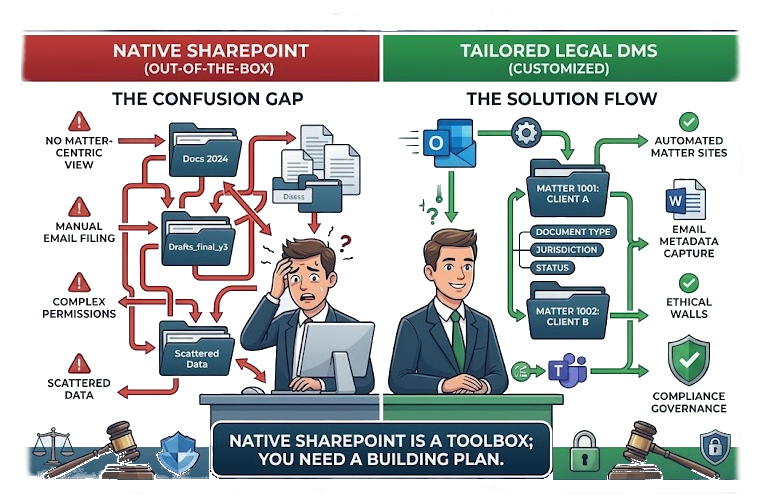
However, SharePoint is a platform—not a complete legal document management system (DMS).
Without legal-specific governance, matter-centric permissions, metadata, retention policies, and standardized document structures, many firms simply recreate the same problems they experienced with legacy file servers.
That’s why successful firms combine SharePoint with a legal practice management platform like PageLightPrime, which adds the governance, workflows, billing, trust accounting, matter management, and compliance controls required by modern law firms.
Who This Guide Is For
This guide is designed for:
- Managing Partners
- Law Firm CIOs
- IT Directors
- Practice Managers
- Legal Operations Teams
- Microsoft 365 Administrators
- Firms migrating from NetDocuments, iManage, Worldox, or shared network drives
Whether your firm has 20 lawyers or 500, these best practices will help improve SharePoint adoption while reducing compliance risks and improving productivity.
Why SharePoint Projects Fail in Law Firms
Across the United States and Canada, more firms are moving to Microsoft 365 to modernize document management and reduce reliance on legacy document management systems. Unfortunately, many SharePoint implementations struggle because firms migrate documents without redesigning how lawyers actually work.
- Too many SharePoint sites
- Confusing folder structures
- Inconsistent permissions
- Duplicate documents
- Poor search results
- Lawyers saving files to desktops or email
- Multiple document versions
- Shadow IT tools like Dropbox or personal OneDrive folders
The problem is rarely with SharePoint itself.
The real issue is implementing SharePoint like a generic collaboration platform instead of a legal document management system.
The following seven mistakes are the most common reasons SharePoint adoption fails—and how PageLightPrime helps law firms avoid them.
Mistake 1: No Legal-Specific Information Architecture
What Goes Wrong
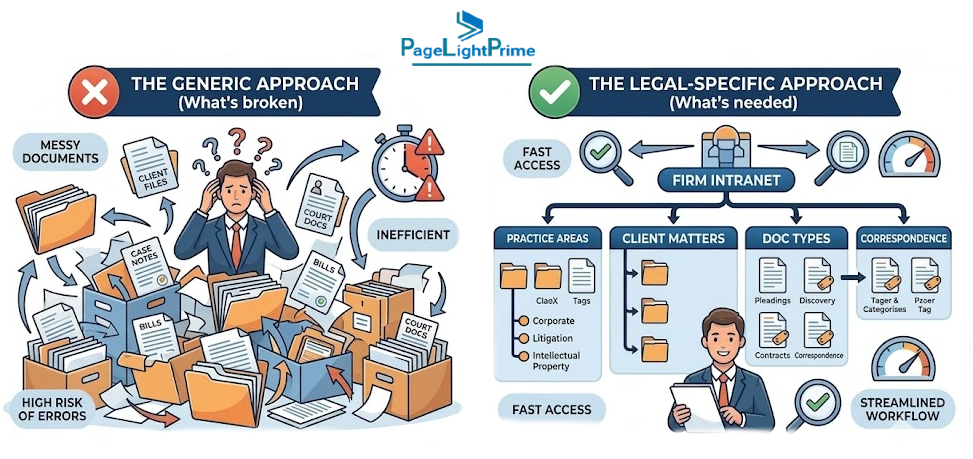
Many firms create generic document libraries such as “Clients” or “Matters” without establishing consistent matter numbering, standardized naming conventions, or logical client hierarchies.
Instead of improving organization, SharePoint becomes another version of the firm’s old network drive—with deep folder structures that make finding documents difficult.
Lawyers don’t think in folders.
They think in matters, clients, document types, deadlines, and practice areas.
When SharePoint isn’t designed around those workflows, users quickly lose confidence in the system.
Impact on Adoption
- Lawyers spend valuable billable time searching for documents.
- New associates struggle to locate files.
- Duplicate folders and documents multiply.
- Search becomes unreliable.
- Users begin storing files outside SharePoint.
How PageLightPrime Fixes It
PageLightPrime provides a legal-specific information architecture built specifically for law firms.
Instead of generic folders, firms receive:
- Standardized Client and Matter workspaces
- Firm Documents libraries
- Practice-area document structures
- Consistent client and matter naming conventions
- Integration with Clio, PracticePanther, and other practice management systems
- Document Sets that organize every matter as a complete digital workspace
- Legal-specific content types that improve search accuracy
The result is a legal document management system that mirrors how lawyers actually practice law rather than how Windows file servers stored documents twenty years ago.

Mistake 2: Skipping Mandatory Metadata and Content Types
What Goes Wrong
Many firms rely entirely on folders.
Unfortunately, folders alone don’t provide the intelligence needed for modern legal document management.
Without mandatory metadata, documents become nearly impossible to filter, automate, or classify.
Lawyers end up searching through hundreds of files named:
- Final.docx
- Final Final.docx
- Agreement Updated.docx
- Contract New Version.docx
Eventually, nobody knows which version is correct.
Impact on Adoption
- Poor search results
- Duplicate documents
- Incorrect versions sent to clients
- Lost productivity
- Reduced confidence in SharePoint
How PageLightPrime Fixes It
PageLightPrime configures mandatory metadata across every legal document library.
Examples include:
- Matter ID
- Client ID
- Practice Area
- Responsible Attorney
- Document Type
- Confidentiality Level
- Status
- Retention Category
Purpose-built legal content types automatically capture this information when documents are created or uploaded.
This metadata powers intelligent search, Microsoft Copilot, filtered document views, automated workflows, and reporting.
Instead of browsing folders, lawyers can instantly locate documents using client names, matter numbers, practice areas, or document categories.
This dramatically improves document retrieval while reducing duplicate content and manual filing.

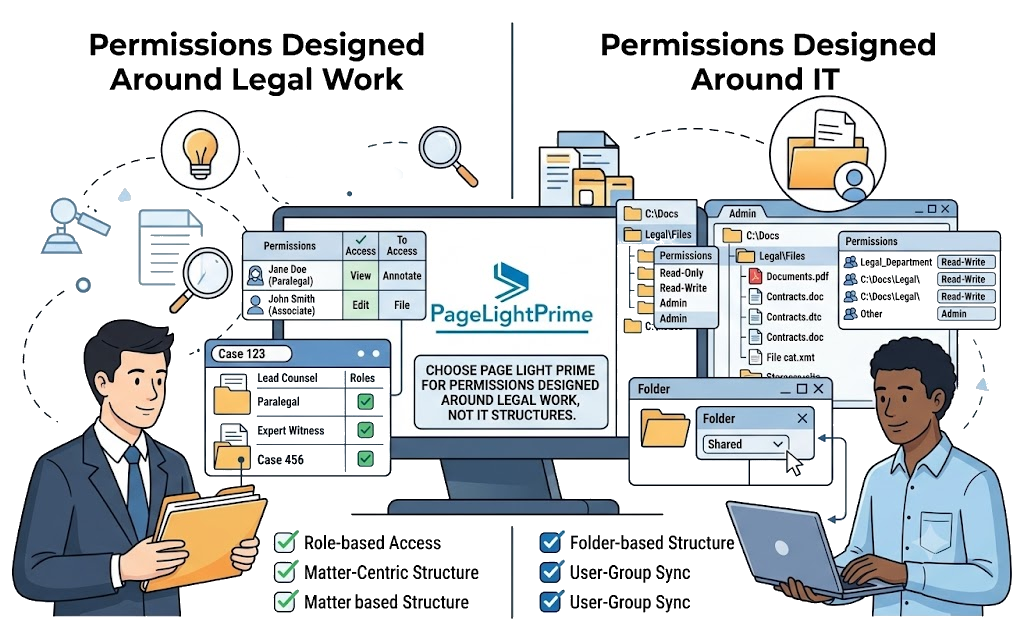
Mistake 3: Permissions Designed Around IT Instead of Legal Work
What Goes Wrong
Many SharePoint implementations assign permissions based on departments or organizational charts rather than the lawyers and staff working on a specific matter.
This creates two major risks:
- Users gain access to confidential information they shouldn’t see.
- Lawyers cannot quickly access documents they need to serve clients.
For firms handling mergers and acquisitions, employment matters, litigation, healthcare, or other sensitive cases, poor permission management increases compliance risks and undermines client trust.
Impact on Adoption
- Partners lose confidence in document security.
- Ethical walls become difficult to enforce.
- Collaboration slows because access requests become routine.
- Users create workarounds by storing documents outside SharePoint.
How PageLightPrime Fixes It
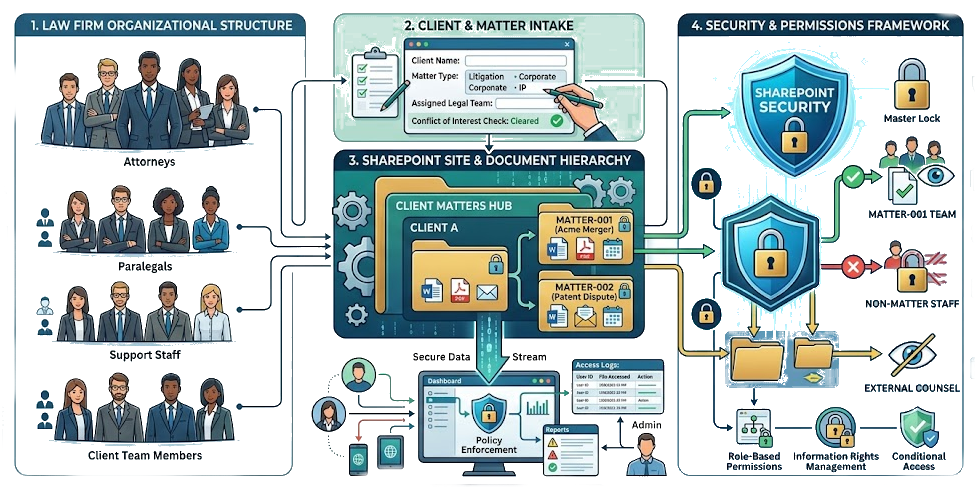
PageLightPrime implements matter-based security, ensuring access is based on legal teams rather than generic IT groups.
- Matter-specific permission groups
- Ethical wall support
- Microsoft Entra ID (formerly Azure AD) integration
- Microsoft Purview Information Protection
- Sensitivity labels
- Restricted external sharing
- Secure guest collaboration when required
- Complete audit trails
This approach protects privileged information while making collaboration simple for authorized team members.

Mistake 4: No Governance or Content Ownership
What Goes Wrong
Many firms launch SharePoint successfully but never establish governance policies.
Over time:
- Site owners leave.
- Libraries become outdated.
- Documents remain active long after matters close.
- Duplicate content grows.
- Search quality declines.
Without governance, SharePoint gradually becomes another unmanaged file repository.
Impact on Adoption
- No trusted source of truth
- Inconsistent retention practices
- Increased compliance risk
- Higher storage costs
- Lower user confidence

How PageLightPrime Fixes It
PageLightPrime establishes governance from day one.
Every workspace includes defined ownership, lifecycle management, and compliance policies.
Governance features include:
- Site ownership policies
- Matter ownership assignments
- Automated archival workflows
- Microsoft Purview retention labels
- Records management
- Review and disposition workflows
- Governance dashboards
- Content health reporting
The result is a SharePoint environment that stays organized long after implementation.

Mistake 5: Ignoring Microsoft Teams, Outlook, and Daily Legal Workflows
What Goes Wrong
Lawyers spend much of their day in Outlook, Microsoft Teams, and Microsoft Word—not in SharePoint.
When SharePoint isn’t integrated into these daily tools, users naturally save emails, attachments, and drafts elsewhere.
Important client communications become scattered across inboxes, desktops, OneDrive, and Teams chats.

Impact on Adoption
- Multiple document versions
- Missing email records
- Poor collaboration
- Lost client correspondence
- Reduced knowledge sharing
How PageLightPrime Fixes It
PageLightPrime embeds document management into the applications lawyers already use.
Key capabilities include:
- Save emails directly to matter workspaces
- File Outlook attachments automatically
- Organize Teams files inside SharePoint matter libraries
- Store meeting notes with related documents
- Power Automate workflow integration
- Microsoft Copilot-ready document repositories
Rather than asking lawyers to change how they work, PageLightPrime brings governance into their existing Microsoft 365 workflow.

Mistake 6: Migrating Existing Chaos into SharePoint
What Goes Wrong
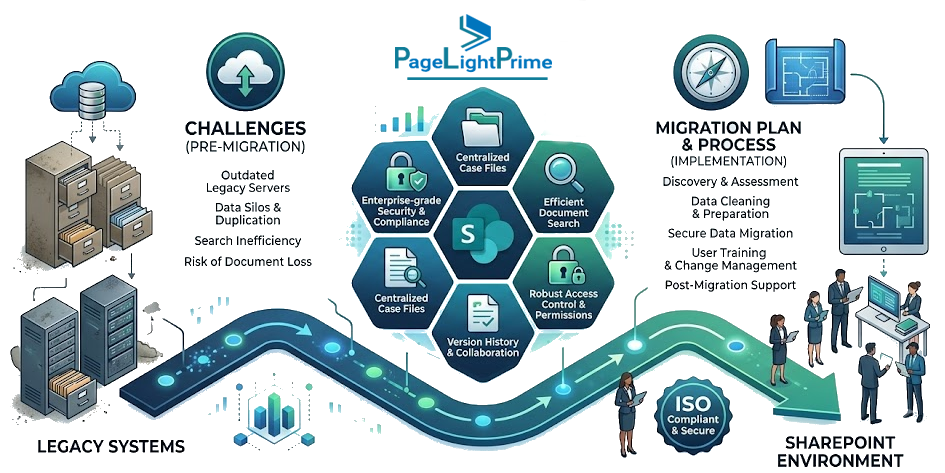
One of the most common implementation mistakes is performing a simple “lift-and-shift” migration from a shared drive or legacy document management system.
Unfortunately, this transfers years of inconsistent folder structures, duplicate files, outdated documents, and poor naming conventions into SharePoint.
The technology changes—but the user experience doesn’t.
Impact on Adoption
- Confusing navigation
- Poor search
- Duplicate content
- Increased storage costs
- User frustration

How PageLightPrime Fixes It
Every migration begins with discovery.
Before moving documents, PageLightPrime helps firms:
- Review existing repositories
- Eliminate redundant files
- Standardize naming conventions
- Define metadata
- Redesign information architecture
- Map legacy folders to matter workspaces expire.
Documents arrive in SharePoint clean, searchable, and properly classified instead of simply copied from one platform to another.

Mistake 7: Treating Training as a One-Time Event
What Goes Wrong
Many firms invest heavily in technology but only provide training during implementation.
As lawyers join the firm and Microsoft 365 evolves, adoption gradually declines.
Users return to familiar habits:
- Saving files locally
- Emailing document versions
- Using personal cloud storage
- Ignoring metadata
- Creating duplicate documents

Impact on Adoption
- Reduced ROI
- Inconsistent document management
- Lower productivity
- Increased support requests
How PageLightPrime Fixes It
Successful adoption requires continuous improvement.
PageLightPrime supports firms through:
- Role-based training
- Partner workshops
- Associate onboarding
- Legal assistant training
- SharePoint champions (“super users”)
- Quick-reference guides
- Adoption reporting
- Continuous governance reviews
Instead of a one-time rollout, firms establish an ongoing culture of effective document management.

SharePoint Alone vs. SharePoint + PageLightPrime
| Feature | SharePoint Alone | SharePoint + PageLightPrime |
|---|---|---|
| Document storage | ✔ | ✔ |
| Version control | ✔ | ✔ |
| Matter workspaces | Limited | ✔ |
| Legal information architecture | Manual | ✔ |
| Matter-based permissions | Manual | ✔ |
| Ethical walls | Complex | ✔ |
| Legal metadata | Manual | ✔ |
| Trust accounting | ✘ | ✔ |
| Billing | ✘ | ✔ |
| CRM | ✘ | ✔ |
| Matter management | ✘ | ✔ |
| Microsoft Copilot readiness | Basic | Optimized |
| Governance dashboards | Limited | ✔ |
Compliance Considerations for US & Canadian Law Firms
Law firms operate under strict confidentiality, record retention, and professional responsibility requirements.
United States
PageLightPrime helps firms align SharePoint with Microsoft 365 capabilities that support:
- ABA Model Rules relating to confidentiality and technology competence
- Client confidentiality obligations
- Auditability
- Records retention
- eDiscovery
- Secure collaboration
Canada
For Canadian firms, governance also supports requirements established by provincial law societies relating to:
- Confidentiality
- Client record management
- Secure storage
- Technology competence
- Information governance
For firms serving clients across both countries, Microsoft 365 Multi-Geo and Microsoft Purview can help address data residency requirements while PageLightPrime applies consistent governance policies across jurisdictions.

What Is PageLightPrime?
PageLightPrime is a Microsoft 365-native legal practice management platform built specifically for law firms.
It combines:
- SharePoint-based legal document management
- Client relationship management (CRM)
- Matter management
- Billing
- Trust accounting
- Workflow automation
- Microsoft Teams integration
- Outlook integration
- Microsoft Copilot readiness
- Compliance and governance
Instead of replacing Microsoft 365, PageLightPrime extends it with legal-specific functionality, allowing firms to continue using familiar Microsoft applications while gaining the capabilities of a modern legal practice management platform.

Why Choose PageLightPrime?
Many software vendors focus on either document management or practice management.
PageLightPrime brings both together within the Microsoft 365 ecosystem.
Instead of maintaining separate platforms for CRM, document management, billing, trust accounting, workflow automation, and collaboration, your firm works from one integrated environment.
With PageLightPrime, your firm can:
- Organize every client and matter with standardized workspaces
- Improve document search with legal-specific metadata
- Protect confidential information using matter-based permissions
- Automate document retention and governance
- Manage billing and trust accounting from the same platform
- Integrate seamlessly with Outlook, Teams, and Microsoft Word
- Prepare your Microsoft 365 environment for Microsoft Copilot and future AI capabilities
The result is a modern legal platform that improves productivity, reduces risk, and helps lawyers spend less time searching for documents and more time serving clients.

Ready to Transform SharePoint into a Legal Document Management System?
If your firm is struggling with scattered documents, inconsistent permissions, poor search results, or low SharePoint adoption, now is the time to rethink your approach.
PageLightPrime helps US and Canadian law firms turn Microsoft 365 into a secure, compliant, and AI-ready legal platform—without replacing the Microsoft tools your team already uses every day.
Whether you’re migrating from NetDocuments , iManage, Worldox, or shared network drives, our specialists can help you design a legal document management strategy that improves productivity, strengthens governance, and supports long-term growth.
Take the Next Step
- Book a 30-minute SharePoint Health Check to identify governance and adoption gaps.
- Request a migration case study to see how firms have improved document retrieval and collaboration.
- Schedule a personalized demo to explore how PageLightPrime combines legal document management, matter management, billing, trust accounting, and Microsoft Copilot readiness in one Microsoft 365-native platform.

“
Final Thoughts
SharePoint is not the reason most legal document management projects fail.
Poor governance, inconsistent information architecture, weak security models, and limited user adoption are the real obstacles.
When combined with legal-specific governance and practice management capabilities, Microsoft 365 becomes a powerful foundation for modern legal operations.
PageLightPrime helps law firms unlock that potential by bringing together document management, compliance, collaboration, billing, trust accounting, and AI readiness into a single Microsoft-native solution built for the legal profession.

“
FAQ: Frequently Asked Questions About Sage Timeslips Alternatives
Can SharePoint Replace NetDocuments, iManage, or Worldox?
For many small to mid-sized law firms, yes.
Firms already invested in Microsoft 365 often find that SharePoint, combined with PageLightPrime, provides a modern alternative that reduces software complexity and vendor lock-in while improving collaboration through Outlook, Teams, Word, and Microsoft Copilot.
The right migration strategy is essential. Simply copying folders into SharePoint without redesigning governance and information architecture often recreates the same problems found in legacy systems.
Is SharePoint Secure Enough for Law Firms?
Yes.
Microsoft 365 includes enterprise-grade security features such as:
- Multi-factor authentication
- Encryption at rest and in transit
- Microsoft Purview Information Protection
- Sensitivity labels
- Data Loss Prevention (DLP)
- Audit logging
- eDiscovery
- Retention policies
PageLightPrime builds on these capabilities by implementing matter-based permissions, ethical walls, governance policies, and legal-specific security controls that help firms protect confidential client information.
How Does SharePoint Work with Microsoft Copilot?
Microsoft Copilot delivers the best results when documents are well organized, consistently tagged, and protected with appropriate permissions.
PageLightPrime improves Copilot readiness by:
- Standardizing matter workspaces
- Applying mandatory metadata
- Eliminating duplicate content
- Managing document lifecycles
- Improving search quality
- Ensuring users only access information they are authorized to view
A well-governed SharePoint environment allows Copilot to deliver more accurate, relevant, and secure responses.
Why Do SharePoint Projects Fail?
Technology is rarely the problem.
Most SharePoint implementations fail because organizations:
- Copy outdated folder structures.
- Skip governance planning.
- Ignore metadata.
- Create inconsistent permissions.
- Provide minimal user training.
- Treat SharePoint as a file server instead of a business platform.
Successful implementations focus equally on people, processes, governance, and technology.
How Long Does a SharePoint Migration Take?
Every firm is different.
The timeline depends on factors such as:
- Number of users
- Volume of documents
- Existing document quality
- Legacy systems
- Required governance
- Compliance requirements
A structured assessment helps identify cleanup opportunities before migration, reducing risk and improving long-term adoption.
Does PageLightPrime Replace Microsoft 365?
No.
PageLightPrime is built on Microsoft 365.
Your firm continues using familiar applications including:
- Microsoft Outlook
- Microsoft Teams
- Microsoft Word
- Microsoft Excel
- Microsoft SharePoint
- Microsoft Copilot
PageLightPrime enhances these applications with legal-specific workflows, governance, matter management, billing, trust accounting, and automation.
Is PageLightPrime Suitable for Small and Mid-Sized Law Firms?
Yes.
PageLightPrime is designed for firms that want enterprise-grade document management and practice management without maintaining multiple disconnected systems.
Whether your firm has 20 employees or several hundred, PageLightPrime provides a scalable foundation that grows with your practice.