
Is SharePoint Enough for a Law Firm Document Management System (DMS)
SharePoint vs iManage vs NetDocuments | Best DMS for Law Firms | Legal DMS on Microsoft 365 | SharePoint for Lawyers
For many law firms, the journey toward better document management for lawyers starts with tools they already own. Microsoft SharePoint—part of Microsoft 365—is often the default choice.
But the real question is not whether SharePoint is powerful.
It’s whether it is enough for a law firm DMS.
Written by Knowledge Team, posted on April 24, 2026

Executive Summary
Choosing between SharePoint, iManage, and NetDocuments depends on your firm’s reliance on the Microsoft 365 ecosystem. While SharePoint offers excellent collaboration, it lacks native legal matter-centricity. Platforms like PageLightPrime bridge this gap by adding a legal workflow layer directly onto your existing Microsoft investment.

TL;DR
- SharePoint works well for small law firms with simple, Microsoft 365–centric needs
- It lacks native legal workflows like matter-centric filing and integrated email management
- iManage and NetDocuments solve this—but as separate legal systems
- SharePoint-based legal DMS platforms (like PageLightPrime) combine Microsoft 365 with legal workflows
In short: SharePoint alone is a strong platform—but not always a complete legal DMS.

Can Microsoft 365 be used as a Legal DMS
Short answer: SharePoint law firm document management system can be enough for some law firms, but not for all.
It works well for smaller or more Microsoft 365–centric firms that want:
- Secure storage
- Collaboration
- Version control
- Permissions
- Retention and eDiscovery features

However, it usually requires careful configuration—and sometimes add-ons—to behave like a true legal DMS.
This question often shows up in different ways:
- SharePoint vs iManage — which is better for law firms?
- SharePoint vs NetDocuments — what’s the difference?
- What is the best DMS for law firms?
- Can Microsoft 365 be used as a legal DMS?
- Is SharePoint a good option for lawyers?
This guide answers all of them—practically, not theoretically.

Why law firms choose SharePoint
SharePoint is attractive because it offers:
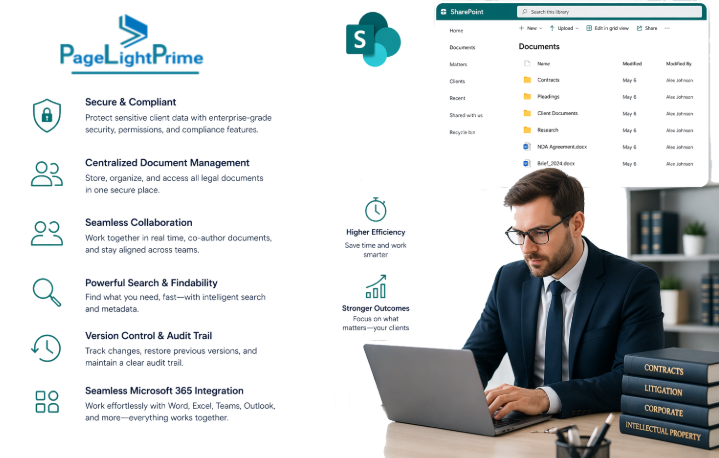
- Deep integration with Outlook, Teams, and OneDrive
- Cloud-based access from anywhere
- Strong security and permission controls
- Built-in compliance and governance tools
For firms already operating inside Microsoft 365, it feels like a natural extension rather than a new system.
And to be fair—SharePoint is an excellent document platform.
Where SharePoint works well for law firms
SharePoint is a strong fit when the firm already lives in Microsoft 365 and wants a single collaboration layer for:
- Documents
- Microsoft Teams communication
- Outlook email workflows
- OneDrive file access
- Compliance and governance controls
With the right setup, it can support:
- Matter-based organization
- Metadata-driven classification
- Version history
- Role-based permissions
All without introducing a separate, legacy DMS platform.
For firms that value standardization and consolidation, this is a major advantage.

Why SharePoint is not a Law Firm DMS out-of-the-box
The main gap is simple:
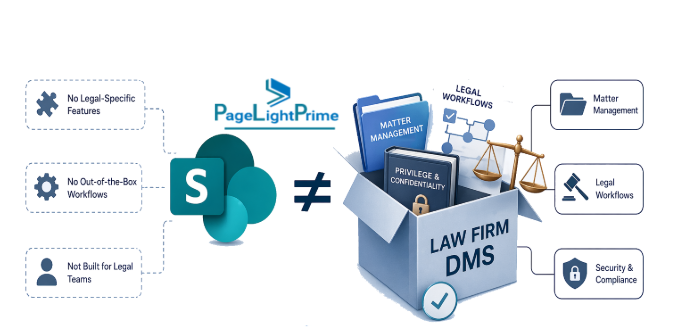
SharePoint is not natively built around legal workflows.
Unlike purpose-built legal systems, it lacks built-in support for:
- True matter-centric filing (without customization)
- Integrated email capture tied to matters
- Advanced legal profiling and search
- Structured check-in/check-out aligned with legal workflows
- Attorney-friendly processes that minimize manual effort
As a result, firms often rely on:
- Manual processes
- Naming conventions
- User discipline
And that’s where risk—and inefficiency—begin to creep in.
What Law Firms Actually Need from a DMS
Legal document management goes far beyond storage. A true DMS must support:
- Matter-centric organization (clients, matters, cases)
- Email as a first-class record
- Reliable version control and auditability
- Document automation and templates
- Integration with billing and accounting
- Compliance, confidentiality, and governance
This is the gap between a document platform and a legal system.

Practical Comparison: SharePoint vs iManage vs NetDocuments
Here’s a practical comparison of SharePoint with iManage and NetDocuments for a law firm DMS.
Fit for Law Firms
| Area | SharePoint | iManage | NetDocuments |
|---|---|---|---|
| Core model | Collaboration platform that can be configured for document management | Legal-first DMS | Legal-first DMS |
| Matter-centric workflow | Possible, but usually needs design and discipline | Strong out of the box | Strong out of the box |
| Email management | Limited natively; often needs add-ons | Mature email-centric workflows | Mature email-centric workflows |
| Search and profiling | Good, but depends on metadata discipline | Built for legal profiling and search | Built for legal profiling and search |
| User experience for attorneys | Can be workable, but less purpose-built | Familiar legal DMS experience | Familiar legal DMS experience |
| Microsoft 365 integration | Excellent | Strong | Strong |
| Best for | Microsoft-first firms with simpler needs | Firms needing robust legal DMS control | Firms needing cloud-first legal DMS control |
Practical Recommendation by Firm Size
Small Firms
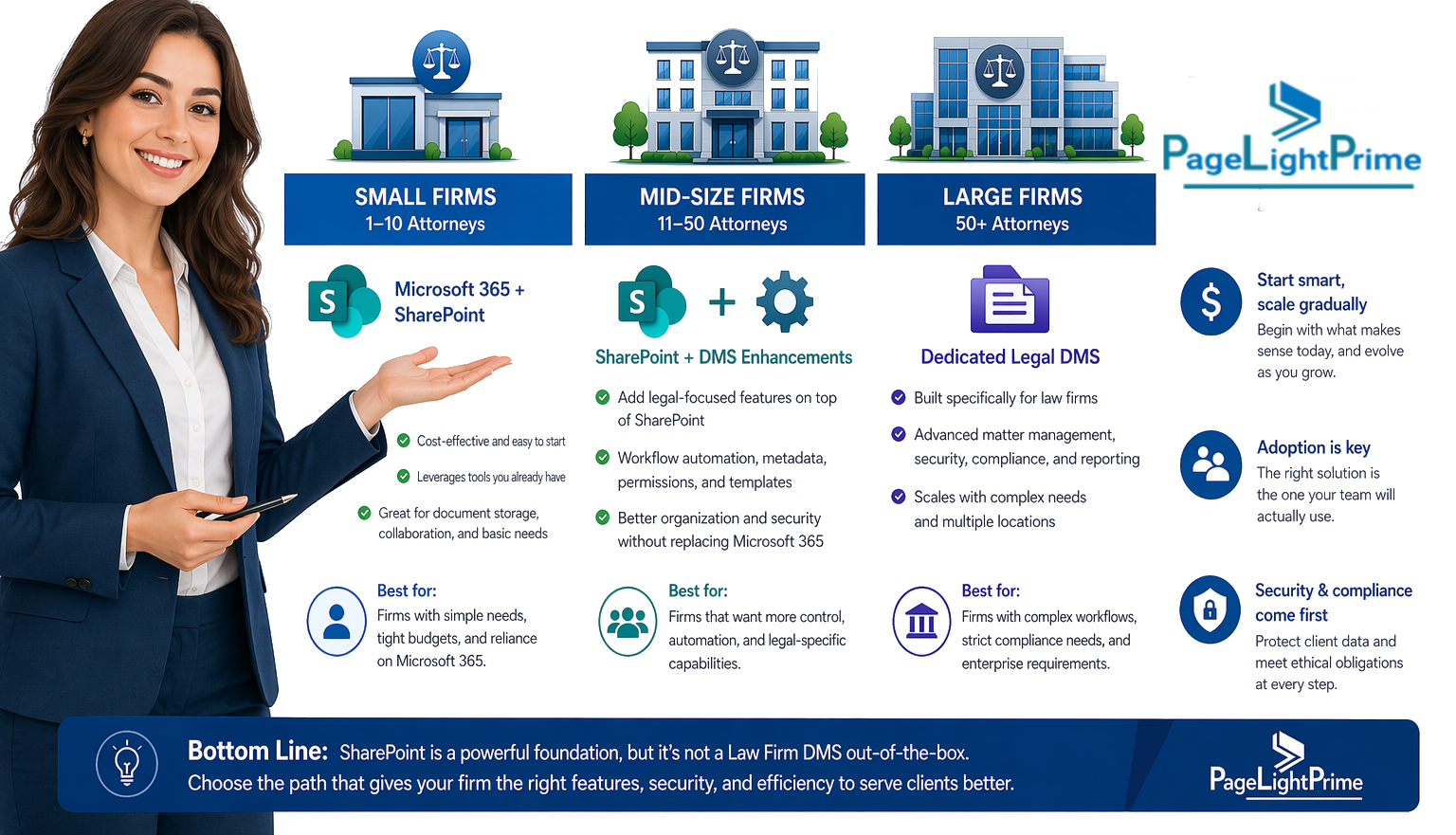
For a small firm, SharePoint can be enough if the team is already using Microsoft 365 and wants a lower-cost, simpler setup.
It works best when:
- Matters are straightforward
- Email filing needs are limited
- Someone enforces naming, metadata, and permissions discipline
Mid-Sized Firms
For a mid-sized firm, SharePoint is often borderline.
It can support collaboration and structured storage—but as expectations grow around:
- Email filing
- Matter-centric search
- Ethical walls
- Reduced user friction
A legal DMS typically starts to deliver clear ROI.
Large Firms
For a large firm, SharePoint alone is usually not enough.
The scale, complexity, and expectations tend to favor platforms like iManage or NetDocuments that are purpose-built for legal workflows.

Law Firm DMS Decision Checklist
Here’s a practical checklist to guide your decision.
Business Needs
- Do you need matter-centric filing, or is shared-folder collaboration enough?
- How much email must be filed and searched by matter?
- Do attorneys expect Outlook integration with minimal clicks?
Control and Compliance
- Do you need ethical walls or highly granular permissions?
- Are retention, legal hold, and auditability mandatory?
- Do you need predictable naming and metadata enforcement?

User Adoption
- Will lawyers actually follow a structured filing process?
- Is the system simple enough for consistent use?
- Will you need training and ongoing admin support?
Microsoft 365 Fit
- Is your firm already standardized on Microsoft 365?
- Do you want Teams, Outlook, and document storage tightly connected?
- Are you comfortable using Microsoft as the foundation platform?
Cost and Complexity
- Is lower licensing cost more important than deeper legal workflows?
- Can your firm handle configuration and governance overhead?
- Would a legal DMS reduce enough friction to justify the investment?

Bridging the Gap: When SharePoint Needs to Behave Like a Legal DMS
By now, the core tension is clear:
- Firms want to stay in Microsoft 365
- But they also need legal-grade workflows
This has led to a third approach.
Extending SharePoint into a legal DMS—rather than replacing it
The Hybrid Solution: SharePoint-Based Legal DMS
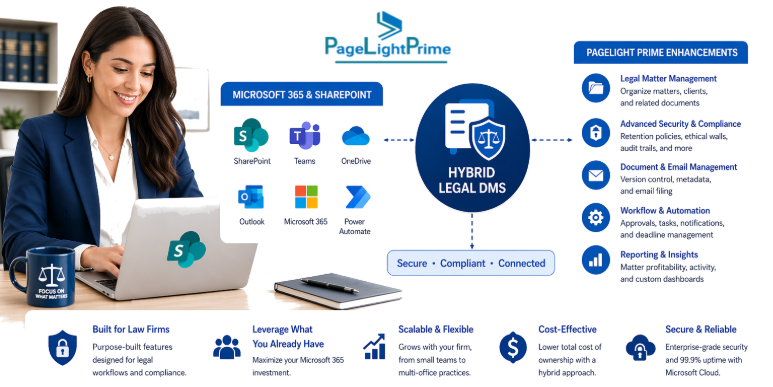
Instead of choosing between raw SharePoint and traditional systems like iManage or NetDocuments, firms are increasingly adopting:
SharePoint-based legal DMS platforms
These solutions keep Microsoft 365 as the foundation—but add the missing legal layer.

What This Approach Adds
A SharePoint-based legal DMS introduces:
- Built-in matter-centric structure
- Email filing directly from Outlook into matters
- Advanced legal search and profiling
- Workflow automation aligned with legal processes
- Granular permissions and ethical controls
The objective is simple:
Keep Microsoft—but remove the gaps.

Where PageLightPrime Fits
Platforms like PageLightPrime take this approach by building a legal DMS layer directly on SharePoint.
This means:
- No need to replace Microsoft 365
- No need to force lawyers into a completely new system
- No reliance on manual discipline to make SharePoint “work”
Instead, it connects:
- Documents
- Emails
- Matters
- Matters

A More Practical Way to Decide
The decision today is no longer just:
- “SharePoint vs iManage”
It’s:
- How do we get legal-grade document management without sacrificing Microsoft 365?

Rule of Thumb
- Choose SharePoint if your priority is a Microsoft 365 document workspace
- Choose iManage or NetDocuments if your priority is a traditional, full-featured legal DMS
- Choose a SharePoint-based legal DMS (like PageLightPrime) if you want:
- Microsoft-native collaboration
- Legal workflows built in
- Reduced user friction
In practice, the larger the firm and the heavier the document and email volume, the more likely SharePoint needs a legal layer like PageLightPrime.
Final Verdict
Is SharePoint enough for a law firm DMS?
- Yes — for smaller, disciplined, Microsoft-centric firms
- No — for firms needing deep legal workflows and scalability
- Increasingly — firms are choosing a hybrid path

Closing Thought
Law firms don’t just manage documents.
They manage:
- Matters
- Risk
- Compliance
- Client relationships
The real goal isn’t just better storage.
It’s a system that understands how legal work actually happens.
And for many firms, the future isn’t choosing between platforms—
It’s making the platform they already use finally work for legal.

Final Comparison: PageLightPrime vs iManage vs NetDocuments
At the end of the day, most law firms evaluating document management arrive at the same shortlist:
- iManage
- NetDocuments
- A SharePoint-based approach like PageLightPrime
All three can work. But they represent very different philosophies.
Side-by-Side: What You’re Really Choosing
| Area | PageLightPrime (SharePoint-based) | iManage | NetDocuments |
|---|---|---|---|
| Core architecture | Built on Microsoft 365 (SharePoint-native) | Proprietary legal DMS | Cloud-native legal DMS |
| Microsoft 365 experience | Native (no system switching) | Integrated but separate system | Integrated but browser-centric |
| Matter-centric workflow | Built into SharePoint layer | Strong, mature | Strong, mature |
| Email management | Integrated with Outlook in Microsoft context | Advanced, deeply embedded | Advanced, strong workflows |
| User experience | Familiar Microsoft UI | Legal DMS interface | Web-based legal interface |
| Deployment model | Uses existing Microsoft investment | Separate platform + licensing | Separate SaaS platform |
| Customization flexibility | High (leverages Microsoft ecosystem) | Structured, but controlled | Structured, less flexible |
| Best fit | Microsoft-first firms wanting legal workflows | Large firms needing deep control | Cloud-first firms wanting turnkey DMS |
The Real Difference Is Architectural
This isn’t just a feature comparison—it’s a platform decision.
iManage
- A proprietary legal system
- Built specifically for law firms
- Highly mature, especially for large and complex environments
- But exists outside Microsoft 365, requiring integration layers
NetDocuments
- A cloud-native legal DMS
- Strong in security, governance, and structured workflows
- Designed as a complete system, not an extension
- Often requires firms to adapt to its model
Both iManage and NetDocuments dominate mid-to-large firm deployments and are considered mature, legal-first platforms

PageLightPrime
PageLightPrime offers deeper UTBMS enforcement and validation.
- A Microsoft-native legal DMS layer
- Built directly on SharePoint and Microsoft 365
- Keeps lawyers inside Outlook, Word, and Teams
- Extends—not replaces—the existing ecosystem
Instead of asking firms to move away from Microsoft, it asks:
What if Microsoft 365 already was your legal DMS?

When Each Approach Wins
Choose PageLightPrime if:
- Your firm is deeply invested in Microsoft 365
- You want one unified system, not multiple platforms
- You value user familiarity and minimal training
- You want to avoid duplication of storage, security, and governance
Choose iManage if:
- You need enterprise-grade legal control at scale
- Your firm is comfortable managing a separate legal system
- You prioritize depth of features over platform consolidation
Choose NetDocuments if:
- You want a fully cloud-hosted, structured legal DMS
- You prefer a turnkey system with less internal configuration
- Your firm is comfortable adapting workflows to the platform

The Strategic Shift Happening in Legal Tech
For years, the decision was simple:
SharePoint or a legal DMS
Now, it’s evolving into:
Stay in Microsoft—and make it legal-ready
That’s the space where PageLightPrime operates.

Global Support for Modern Law Firms
Whether you are a New York litigation boutique requiring strict ethical walls or a London-based global firm needing GDPR-compliant document governance, the choice of DMS must reflect your local regulatory landscape. Our SharePoint-native solution supports regional data residency and compliance standards across the US, UK, Canada, and Australia.

“
Final Takeaway
- iManage and NetDocuments are proven legal systems
- SharePoint alone is a powerful but incomplete platform
- PageLightPrime represents a third path
Legal DMS, native to Microsoft 365
For many firms, the question is no longer:
“Which DMS is best?”
It’s:
Do we bring legal work into our platform—or move our platform to the legal system?
That answer will define your firm’s efficiency, adoption, and long-term scalability far more than any feature checklist.

“
FAQ: Frequently Asked Questions
What’s the difference between SharePoint, iManage, and NetDocuments?
SharePoint is a Microsoft collaboration/storage platform that can be extended; iManage and NetDocuments are purpose-built legal DMS platforms with mature matter-centric and email workflows.
Do I need add-ons to make SharePoint legal‑ready?
Typically yes — add-ons or a SharePoint-based legal layer (e.g., PageLightPrime) provide matter-centric filing, integrated email capture, profiling, and legal workflows.
How does email filing work with SharePoint?
Native email capture is limited; firms use Outlook add-ins, flow automations, or a legal layer to file emails directly to matters and preserve metadata and context.
Which firms should choose SharePoint vs a legal DMS?
Choose SharePoint for small, Microsoft-first firms prioritizing consolidation; choose iManage/NetDocuments for large firms needing deep legal controls; choose a SharePoint-based legal DMS if you want Microsoft-native UX plus legal workflows.
What are key factors when evaluating a law firm DMS?
Matter-centricity, email management, search/profiling, auditability/retention, Outlook/Word integration, user adoption friction, compliance/ethical walls, and total cost of ownership.