
Microsoft 365 Copilot for Law Firms: How PageLightPrime Creates an AI-Powered Legal Automation Platform
Microsoft 365 Copilot alone does not create an AI-powered law firm. Copilot becomes significantly more effective when connected to structured legal data, matter workflows, legal document management, and compliance controls.
PageLightPrime provides this legal operating layer inside Microsoft 365, enabling attorneys to automate workflows, generate documents, analyze matters, and securely interact with firm data using AI.
Written by Knowledge Team, posted on May 27, 2026

Introduction: AI Requires More Than Just a Copilot
In 2026, law firms are moving swiftly beyond basic document automation and traditional, siloed practice management systems. The next generation of legal productivity demands a seamless combination of generative AI, structured workflow automation, and matter-centric data management to power modern legal operations.
With the introduction of Microsoft 365 Copilot for law firms, legal teams can now transition from static automation to conversational AI. However, an AI’s effectiveness depends entirely on the quality, governance, and structure of the information it can access.

Microsoft 365 Copilot can generate content and summarize information, but it becomes significantly more powerful when connected to an in-tenant, structured legal environment containing:
- Client and matter information
- Approved legal templates and clause libraries
- Centralized document repositories
- Rigorous case workflows
- Billing and operational data
This is where PageLightPrime legal automation on Microsoft 365 becomes a critical foundation. By bringing legal practice management,, document automation, and legal document management directly into the Microsoft 365 digital firewall, PageLightPrime creates a structured environment where Copilot can safely work with trusted legal data.

What Is Microsoft 365 Copilot for Law Firms?
Microsoft 365 Copilot for law firms is an artificial intelligence assistant that helps attorneys create documents, summarize legal information, analyze communications, and interact with matter-related data inside Microsoft 365 applications such as Word, Outlook, Teams, and SharePoint.
When combined with legal automation software such as PageLightPrime, Microsoft 365 Copilot can access structured legal data, including client information, matter records, approved templates, documents, workflows, and operational information. This enables law firms to automate complex legal workflows while maintaining security, governance, and attorney oversight.
Unlike general-purpose AI tools that operate without legal context, Microsoft 365 Copilot becomes significantly more powerful when connected to a structured legal practice management environment.

PageLightPrime provides the legal intelligence layer that organizes information around clients and matters, allowing Copilot to deliver more accurate, relevant, and workflow-aware assistance.
In an AI-powered law firm environment, Microsoft 365 Copilot can help attorneys:
- Draft and refine legal documents using firm-approved templates and matter information.
- Summarize contracts, case files, litigation materials, and client communications.
- Retrieve relevant information from connected legal repositories.
- Analyze documents for risks, missing provisions, and compliance requirements.
- Automate multi-step legal workflows through natural language instructions.
Microsoft 365 Copilot provides the intelligence layer, while PageLightPrime provides the structured legal foundation required for secure, reliable, and practical AI-powered legal automation.

How Microsoft 365 Copilot Helps Law Firms
Microsoft 365 Copilot helps law firms transform everyday legal work by bringing artificial intelligence directly into the applications attorneys already use, including Microsoft Word, Outlook, Teams, and SharePoint.
However, its effectiveness depends on having access to structured, accurate, and permission-controlled legal information.
For law firms, Microsoft 365 Copilot can assist with:
Intelligent Legal Document Drafting
Microsoft 365 Copilot helps attorneys create legal documents by combining natural language instructions with existing firm knowledge.
When connected with PageLightPrime, Copilot can use:
- Client and matter information
- Approved legal templates
- Prior agreements
- Clause libraries
- Historical work product
- Matter-specific instructions
This allows attorneys to move beyond manually searching for documents and assembling information from multiple systems.

Legal Matter Summarization
Law firms often manage matters containing thousands of pages of documents, communications, and case history.
Microsoft 365 Copilot can help summarize:
- Case files
- Contracts
- Discovery materials
- Email communications
- Transaction documents
- Litigation bundles
When supported by PageLightPrime’s matter-centric organization, Copilot can provide summaries based on relevant legal context rather than isolated documents.

AI-Assisted Legal Research and Information Discovery
Traditional legal workflows often require attorneys and staff to search through multiple systems to locate information.
Microsoft 365 Copilot enables natural language discovery, allowing attorneys to ask questions such as:
“Summarize the key contractual obligations for this client based on the current matter documents.”
Instead of manually navigating folders and databases, attorneys can interact with structured legal information.

Automated Legal Workflows
Microsoft 365 Copilot becomes significantly more powerful when combined with legal automation.
Through PageLightPrime, Copilot can support workflows involving:
- Document creation
- Client intake
- Matter updates
- Email analysis
- Approval processes
- Billing operations
- Compliance reviews
This creates an AI-assisted legal operating environment where technology supports attorneys throughout the lifecycle of a matter.

Microsoft 365 Legal Practice Management Software Architecture
Modern legal technology requires more than document storage and basic productivity tools.
A Microsoft 365 legal case management architecture combines Microsoft’s enterprise foundation with legal-specific automation, matter management, document intelligence, workflow controls, and AI assistance.
The future of legal technology is not another isolated application. It is an integrated ecosystem where productivity, legal operations, and artificial intelligence operate together.
A modern Microsoft 365 legal platform consists of three interconnected layers.

Layer 1: Microsoft 365 — The Enterprise Foundation
Microsoft 365 provides the foundation where legal work already occurs.
Core technologies include:
- Microsoft Word for legal drafting
- Outlook for attorney communications
- Teams for collaboration
- SharePoint for secure document management
- Azure services for enterprise infrastructure
- Microsoft Entra ID for identity management
- Microsoft Purview for compliance and information governance
Microsoft 365 provides the security, scalability, and enterprise controls required by modern law firms.

Layer 2: PageLightPrime — The Legal Intelligence Layer
PageLightPrime adds the specialized legal structure required for AI-powered legal operations.
Instead of storing documents in disconnected folders, PageLightPrime organizes information around:
- Clients
- Matters
- Legal workflows
- Documents
- Time tracking
- Billing processes
- Compliance requirements
This structured legal foundation allows Microsoft 365 Copilot to understand the context behind legal information.

Layer 3: Microsoft 365 Copilot — The AI Assistance Layer
Microsoft 365 Copilot transforms structured legal information into actionable intelligence.
It allows attorneys to interact with their legal operating environment using natural language.
Examples:
- “Summarize this matter’s history.”
- “Draft a response using the approved firm template.”
- “Identify missing provisions in this agreement.”
- “Prepare a timeline from these case documents.”
Copilot provides the intelligence layer, while PageLightPrime provides the legal context required for accurate and secure AI assistance.

Benefits of AI Legal Automation for Law Firms
AI legal automation enables law firms to improve efficiency, consistency, accuracy, and client service by combining artificial intelligence with structured legal workflows.
The objective of AI legal automation is not to replace attorneys. Instead, it creates an intelligent legal operating environment where attorneys can spend more time on legal analysis, strategy, and client relationships while technology manages repetitive operational tasks.
Modern law firms require more than isolated AI tools. They need AI systems that understand legal context, maintain security controls, and operate within established workflows.

Faster Legal Document Creation
AI-assisted drafting reduces the time required to create contracts, pleadings, correspondence, discovery responses, transaction documents, and other legal work product.
Traditional document automation relies heavily on predefined templates and manual data entry. Attorneys often need to locate the correct template, gather client information, review previous agreements, and manually update documents.
By combining Microsoft 365 Copilot with PageLightPrime’s structured legal data, attorneys can generate documents using:
- Firm-approved templates
- Matter-specific information
- Previous agreements and legal positions
- Clause libraries
- Client instructions
- Historical matter documents
- Practice-specific workflows
This transforms legal document creation from a manual assembly process into an intelligent drafting workflow.

Improved Matter Intelligence
Law firms generate significant amounts of information across emails, documents, contracts, billing records, communications, and case materials.
Traditional systems often store this information separately, making it difficult for attorneys to understand the complete context of a matter.
AI-powered legal automation creates matter intelligence by connecting:
- Client information
- Case history
- Legal documents
- Communications
- Deadlines
- Workflow activities
- Billing information
- Operational data
This enables attorneys to quickly understand matter status, identify important information, and make better-informed decisions.

This enables attorneys to quickly understand matter status, identify important information, and make better-informed decisions.
Instead of searching across multiple systems, attorneys can interact with matter information through natural language questions.
Examples:
- “Summarize the current status of this litigation matter.”
- “Identify all outstanding client requests.”
- “Prepare a timeline of key events.”
- “Find agreements containing similar indemnification language.”

Reduced Administrative Work
Attorneys and legal staff spend substantial time performing repetitive administrative tasks.
Common examples include:
- Searching for documents
- Reviewing email threads
- Entering information into systems
- Updating matter records
- Preparing status reports
- Organizing case materials
- Creating routine correspondence
AI legal automation reduces these activities by allowing technology to locate, summarize, classify, and organize information automatically.
This allows legal professionals to focus on higher-value activities such as:
- Legal analysis
- Negotiation strategy
- Client counseling
- Case preparation
- Business development

Enhanced Compliance and Governance
Legal organizations require strict controls over confidential client information.
AI-powered legal platforms must operate within established security frameworks, including:
- User permissions
- Document access controls
- Data governance policies
- Compliance requirements
- Auditability
- Information protection rules
When AI operates within Microsoft 365 and PageLightPrime’s structured legal environment, firms can leverage artificial intelligence while maintaining control over sensitive legal information.

Why Law Firms Need AI-Ready Legal Data
Artificial intelligence is only as effective as the information it can access.
For law firms, generic AI tools are limited because legal work depends on highly structured relationships between:
- Clients
- Matters
- Documents
- Communications
- Workflows
- Billing information
- Compliance requirements
A legal AI assistant without structured legal data cannot fully understand the context required for meaningful assistance.
AI-ready legal data creates the foundation necessary for accurate, secure, and practical AI-powered workflows.

Characteristics of AI-Ready Legal Data
Matter-Centric Organization
Legal information must be organized around actual legal matters rather than disconnected folders.
A matter-centric approach connects:
- Client records
- Case documents
- Communications
- Tasks
- Deadlines
- Billing activities
- Workflow status
This gives AI the context required to provide useful and relevant responses.
For example, an AI system should understand that:
- A contract belongs to a specific client.
- That client is associated with multiple matters.
- Each matter has unique documents, communications, deadlines, and billing information.
This contextual relationship is what separates legal AI automation from general-purpose AI tools.

Trusted Knowledge Sources
AI systems must work with reliable information.
Law firms require AI access to:
- Approved templates
- Standard clauses
- Firm policies
- Prior work product
- Controlled document repositories
- Matter-specific records
This helps ensure AI-generated content aligns with firm standards and attorney expectations.
Permission-Based Access
Confidentiality is fundamental to legal practice.
AI systems must respect existing security controls so attorneys and staff only access information they are authorized to view.
Microsoft 365 security capabilities, including:
- Microsoft Entra ID
- Microsoft Purview
- SharePoint security controls
help maintain identity management, information protection, and compliance requirements.

Operational Context
Legal work is not limited to documents.
AI must understand relationships between:
- Emails
- Documents
- Billing activity
- Matter history
- Workflow status
- Client communications
- Attorney activities
PageLightPrime creates this AI-ready foundation inside Microsoft 365 by transforming disconnected information into structured legal intelligence that Microsoft 365 Copilot can securely utilize.

From Static Templates to Agentic AI Legal Workflows
Traditional legal document automation solved a major challenge: eliminating repetitive manual work by using fixed, form-driven templates.
However, these systems still require attorneys to:
- Follow rigid processes
- Complete manual questionnaires
- Search for information across systems
- Copy information between applications
- Manually review and update documents
The integration of PageLightPrime and Microsoft 365 Copilot introduces Agentic AI legal workflows.
These are intelligent AI systems capable of understanding objectives, locating relevant information across applications, and executing multi-step tasks within a governed framework.

What Is Agentic AI in Legal Technology?
Agentic AI refers to artificial intelligence systems capable of completing multiple connected actions to achieve a defined objective while operating within established rules and human oversight.
Unlike traditional automation, which follows predefined steps, agentic AI can:
- Understand a business objective
- Identify required information
- Determine appropriate actions
- Execute multiple workflow steps
- Generate results for attorney review
In legal practice, this creates a significant shift from automation based on forms and buttons to automation based on natural language instructions.

The Shift in Action
Traditional Request:
“Which form questionnaire do I need to open to generate a commercial lease amendment?”
Agentic AI Request:
“Create a commercial lease amendment for this client based on our previous agreements and the latest instructions received by email.”
When an attorney provides a natural language instruction, the integrated system securely executes the underlying workflow:
- Identifies the exact matter and client records within PageLightPrime.
- Locates the firm-approved template from the secure SharePoint repository.
- Retrieves client context and historical positions from previous PageLightPrime documents.
- Pulls relevant clauses and recent email instructions from Outlook.
- Generates an intelligent first draft in Microsoft Word.
- Highlights areas requiring final attorney review.
Agentic AI changes legal automation from a process where attorneys operate software into an environment where attorneys collaborate with intelligent systems.

How Copilot and PageLightPrime Transform Legal Document Automation
By embedding PageLightPrime’s structured practice data into the Microsoft ecosystem, Copilot enhances legal document generation across four key operational areas:
1. Intelligent Clause Selection
Modern law firms maintain extensive clause libraries.
PageLightPrime organizes these libraries within SharePoint based on:
- Matter type
- Jurisdiction
- Historical success
- Firm standards
- Practice area requirements
Copilot can analyze current case parameters and recommend the most relevant firm-approved clauses during drafting.
This transforms clause selection from a manual search process into an intelligent recommendation workflow.

2. Automated Data Extraction
Legal teams spend significant time reviewing discovery materials, PDFs, contracts, and client intake information.
Copilot can extract critical information, including:
- Party names
- Effective dates
- Financial values
- Contract obligations
- Key legal provisions
- Important deadlines
This information can then be mapped into structured PageLightPrime matter fields and automated Microsoft Word templates.
The result is reduced manual data entry, improved accuracy, and faster document preparation.
3. AI-Powered Risk Analysis and Document Review
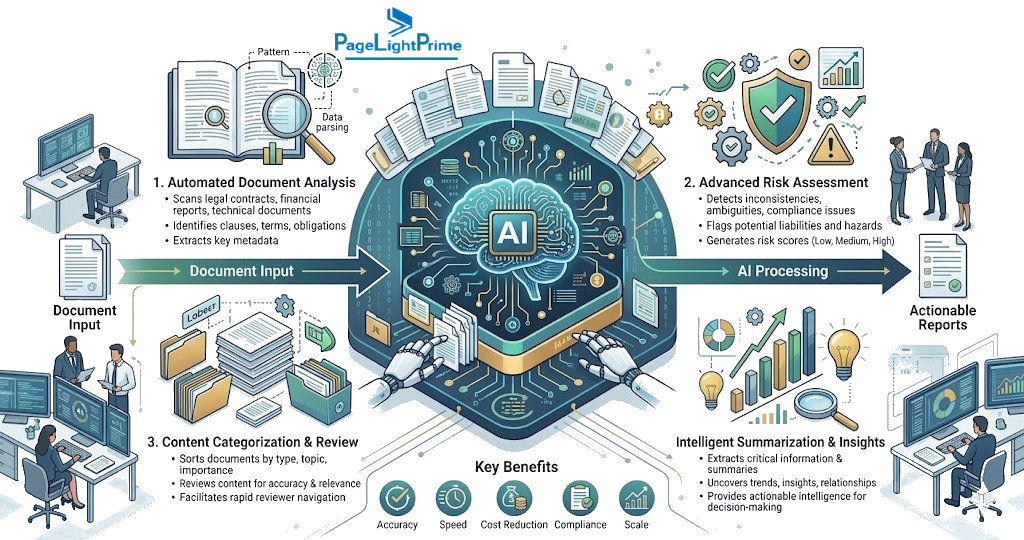
Generating a legal document is only one part of the workflow. Modern law firms also need tools that help review, analyze, and improve documents before they reach clients, opposing counsel, courts, or business partners.
Microsoft 365 Copilot, when combined with PageLightPrime’s structured legal environment, can assist attorneys by analyzing documents against firm-defined standards and identifying potential issues.
Copilot can help review documents for:
- Missing mandatory provisions
- Deviations from approved firm language
- Unusual liability terms
- Inconsistent definitions
- Potential compliance concerns
- Contractual risks
- Drafting inconsistencies
For example, an attorney could request:
“Review this agreement against our approved commercial contract standards and identify provisions that require attention.”
Copilot can analyze the document while using firm-approved templates, clauses, and historical documents stored within the Microsoft 365 environment.
This creates a proactive review process where attorneys receive intelligent insights before final approval.
4. Litigation Bundle and Closing Book Summarization
Complex litigation matters and commercial transactions often involve thousands of pages of documents.
Traditional review processes require attorneys and legal staff to manually search through:
- Pleadings
- Discovery materials
- Depositions
- Contracts
- Correspondence
- Exhibits
- Transaction documents
This creates significant time pressure, especially when preparing for hearings, negotiations, trials, or closings.

By working with PageLightPrime’s organized matter structures, Microsoft 365 Copilot can analyze large collections of legal information and generate:
- Executive summaries
- Case timelines
- Key event summaries
- Document overviews
- Important issue identification
- Chronological analysis
- Transaction summaries
For example:
“Prepare a timeline of all significant events related to this litigation matter using the available case documents and communications.”
Copilot can help transform large volumes of legal information into actionable knowledge while allowing attorneys to maintain control over final review and legal judgment.

Microsoft 365 Copilot vs Traditional Legal Software
For decades, traditional legal software platforms have helped law firms organize matters, manage documents, track time, and automate repetitive processes.
However, many legacy legal systems were designed around:
- Folder-based document storage
- Manual searches
- Form-driven workflows
- Static templates
- Separate technology systems
The emergence of Microsoft 365 Copilot combined with a legal automation platform such as PageLightPrime represents a shift from traditional legal software toward an AI-powered legal operating environment.
Instead of simply storing information, an AI-powered Microsoft 365 legal platform connects documents, communications, workflows, and matter intelligence to help attorneys interact with legal data using natural language.

Traditional Legal Software vs AI-Powered Microsoft 365 Legal Platform
| Traditional Legal Software | AI-Powered Microsoft 365 Legal Platform |
|---|---|
| Folder-based document organization where users manually search for files | Matter-centric intelligence that organizes documents, communications, workflows, and information around clients and legal matters |
| Manual searches requiring attorneys and staff to locate information across multiple systems | Natural language discovery that allows attorneys to ask questions and retrieve relevant matter information using AI |
| Static templates requiring users to complete forms and follow predefined processes | AI-assisted drafting that uses matter data, approved templates, historical documents, and firm-specific knowledge |
| Separate AI tools disconnected from legal workflows and practice management systems | Integrated legal ecosystem combining Microsoft 365, PageLightPrime, and Copilot within a secure environment |
| Document repositories focused primarily on storage | Intelligent legal knowledge systems that connect documents, emails, billing information, and matter history |
| Manual review of large volumes of legal information | AI-powered summarization, analysis, and extraction of critical information from complex legal materials |
| Limited understanding of relationships between matters, clients, documents, and workflows | Context-aware AI assistance based on structured legal data and permission-controlled access |
Why AI-Powered Legal Platforms Are Replacing Traditional Approaches
The difference between traditional legal software and AI-powered legal automation is not simply the addition of artificial intelligence.
The fundamental change is the creation of a connected legal operating environment where AI can understand the context of legal work.
Traditional systems often require attorneys to adapt their processes to the software.
AI-powered Microsoft 365 legal platforms allow technology to adapt to the way attorneys already work by connecting:
- Client and matter information
- Legal documents and templates
- Email communications
- Workflow processes
- Billing and operational data
- Firm knowledge repositories
This enables attorneys to move from searching for information to interacting with information.

Example Workflow Comparison
Traditional Legal Software Approach
An attorney needs to prepare a contract amendment.
The process may require:
- Searching the document management system.
- Locating the correct client matter.
- Finding the latest agreement.
- Searching for an approved template.
- Reviewing prior documents manually.
- Copying relevant information into a new document.
- Sending the draft for review.
This process depends heavily on manual effort and individual knowledge.

AI-Powered Legal Platform Approach
An attorney provides a natural language request:
“Create a contract amendment using the client’s previous agreements, approved firm template, and latest matter instructions.”
The system can:
- Identify the correct client and matter.
- Retrieve relevant historical documents.
- Locate the approved template.
- Extract necessary information.
- Generate a first draft in Microsoft Word.
- Highlight areas requiring attorney review.
The attorney remains responsible for legal judgment while AI accelerates preparation and organization.

Key Synergies: PageLightPrime Foundation + Copilot Enhancement
The combination of PageLightPrime and Microsoft 365 Copilot creates a legal technology architecture where legal automation provides structure and Copilot provides intelligence.
| Legal Workflow | PageLightPrime Foundation | Microsoft 365 Copilot Enhancement |
|---|---|---|
| Matter Management | Centralized client, case, and custom matter records inside Microsoft 365 | Provides contextual AI responses grounded in specific matter history |
| Document Automation | Smart legal templates, dynamic fields, and core assembly rules | Generates and refines intelligent drafts using natural language prompts |
| Legal DMS | Document control organized through matter-centric SharePoint structures | Summarizes, searches, and conducts deep analysis across repositories |
| Client Intake | Structured intake forms and initial data capture | Extracts and summarizes critical client onboarding requirements automatically |
| Email Management | Matter-linked communication records and Outlook integrations | Surfaces insights, tracks important discussion points, and identifies timeline events |
| Billing Operations | Compliant trust accounting, time tracking, and invoice workflows | Generates operational summaries and productivity insights |
Why Data Ownership and In-Tenant Architecture Matter
Many standalone legal AI tools operate outside a firm’s existing technology environment.
While these tools may provide artificial intelligence capabilities, they can introduce challenges related to:
- Client confidentiality
- Data security
- Compliance requirements
- Information governance
- Control over proprietary firm knowledge
For law firms, AI adoption requires more than intelligence. It requires trust.
Legal organizations must ensure that AI systems operate within the same security and compliance framework used to protect confidential client information.

The Importance of an In-Tenant Legal AI Architecture
Because PageLightPrime is built as an in-tenant legal operating layer, all legal data remains within the firm’s secure Microsoft 365 environment.
This means:
- Client information remains within the firm’s controlled Microsoft tenant.
- Existing Microsoft security policies continue to apply.
- Access permissions remain governed by the firm’s identity and security model.
- Legal workflows operate within the firm’s established technology environment.
PageLightPrime does not require law firms to move confidential legal information into a separate external AI platform.
Instead, it extends the Microsoft ecosystem by adding legal-specific intelligence, workflow automation, and matter-centric organization.

Secure AI Foundation for Modern Law Firms
Firms can confidently deploy Microsoft 365 Copilot knowing that it works within established Microsoft security and compliance capabilities, including:
Microsoft Entra ID for Identity and Access Control
Microsoft Entra ID provides identity management and access controls that help ensure users only access information they are authorized to view.
In a legal environment, this is essential because attorneys, paralegals, administrators, and external collaborators may require different levels of access to sensitive matter information.

Microsoft Purview for Data Governance and Compliance
Microsoft Purview provides information protection, compliance management, and governance capabilities.
For law firms, this supports:
- Data classification
- Information protection policies
- Compliance monitoring
- Retention management
- Governance controls
These capabilities help firms adopt AI while maintaining appropriate oversight.

Data Isolation and Protection of Firm Intelligence
A law firm’s documents, legal templates, client information, and historical work product represent valuable intellectual property.
An AI-ready legal platform must ensure that proprietary firm intelligence remains protected.
With PageLightPrime and Microsoft 365 Copilot:
- Firm data remains within the organization’s controlled environment.
- Existing permissions continue to govern access.
- Proprietary legal information is not exposed to unauthorized systems.
- AI assistance operates within established governance controls.
This creates an AI foundation where technology assists attorneys without compromising the confidentiality requirements of modern legal practice.

The Future AI-Native Law Firm
The future law firm will not be defined by replacing attorneys with artificial intelligence.
Instead, successful firms will provide attorneys with an intelligent operating system that understands:
- Firm workflows
- Legal documents
- Client relationships
- Matter history
- Operational processes
- Business requirements
Automation alone is no longer enough.
Automation builds the necessary workflow foundation, while Copilot provides the intelligence layer to navigate those workflows.

The winning architecture combines:
PageLightPrime + Microsoft 365 + Microsoft 365 Copilot
into a secure, scalable, and intelligent legal technology ecosystem.
By grounding generative AI in structured, firm-controlled legal data, law firms can:
- Improve turnaround times
- Reduce administrative bottlenecks
- Increase operational efficiency
- Improve document quality
- Deliver better client experiences
- Enable attorneys to focus on higher-value legal work
The AI-native law firm is not a firm where machines replace lawyers.
It is a firm where lawyers have better intelligence, better workflows, and better technology supporting every matter.
“
Final Conclusion
Artificial intelligence will transform legal operations, but successful adoption requires more than adding an AI assistant.
The future belongs to firms that combine:
- Secure enterprise technology
- Structured legal data
- Intelligent workflows
- Matter-centric information management
- AI-powered assistance
Microsoft 365 provides the enterprise foundation.
PageLightPrime provides the legal intelligence layer.
Microsoft 365 Copilot provides the AI capability.
Together, they create the foundation for the AI-native law firm.

“
FAQ: Frequently Asked Questions
How does PageLightPrime make Microsoft 365 Copilot more effective?
Microsoft 365 Copilot becomes more powerful when it has access to structured and trusted information.
PageLightPrime provides the legal context required by organizing:
- Client records
- Matter information
- Legal documents
- Templates
- Workflows
- Billing data
- Communication history
Instead of responding based on disconnected files, Copilot can provide responses grounded in a firm's legal operating environment.
What is Agentic AI in legal technology?
Agentic AI refers to AI systems capable of completing multi-step tasks based on a high-level objective while operating within defined rules and human oversight.
In legal workflows, agentic AI can:
- Understand an attorney's request.
- Identify the relevant matter.
- Locate required documents.
- Extract relevant information.
- Generate a draft.
- Prepare the result for attorney review.
This represents a shift from traditional automation based on forms and fixed workflows toward intelligent workflow execution.
Can Microsoft 365 Copilot replace legal practice management software?
No.
Microsoft 365 Copilot is an AI assistance layer, not a complete legal practice management system.
Law firms still require structured legal platforms that manage:
- Matters
- Clients
- Documents
- Workflows
- Billing
- Compliance processes
PageLightPrime provides the legal operating foundation that allows Copilot to deliver meaningful AI assistance within a structured environment.
What are the benefits of AI legal automation for law firms?
AI legal automation helps law firms:
- Reduce repetitive administrative work
- Accelerate document creation
- Improve matter visibility
- Summarize large volumes of information
- Improve workflow consistency
- Enhance compliance and governance
The goal is to increase attorney productivity while maintaining professional judgment and oversight.
Why do law firms need AI-ready legal data?
AI systems depend on the quality and structure of the information they access.
Law firms need AI-ready data because legal work requires relationships between:
- Clients
- Matters
- Documents
- Communications
- Workflows
- Billing information
Without structured legal data, AI cannot reliably understand legal context.
Is client data safe when combining Microsoft 365 Copilot and PageLightPrime?
Yes, when deployed within the firm's Microsoft 365 environment and configured according to appropriate security policies.
PageLightPrime utilizes an in-tenant architecture, allowing firms to maintain their existing Microsoft security framework.
Microsoft 365 security and compliance capabilities, including Microsoft Entra ID and Microsoft Purview, help maintain access control, governance, and information protection.
What is the best AI platform for law firms using Microsoft 365?
The best AI platform for a law firm depends on the firm's workflows, security requirements, practice areas, and technology environment.
For firms already using Microsoft 365, combining:
- Microsoft 365
- Microsoft 365 Copilot
- PageLightPrime legal automation
creates an integrated AI-powered legal operating environment.
This approach allows firms to leverage their existing Microsoft investment while adding legal-specific automation, matter intelligence, and workflow capabilities.