
Migrating a Law Firm Off QuickBooks: A Practical Guide for a Smooth Transition
Migrating a law firm off QuickBooks is rarely just an accounting software change. For law firms, the real challenge is protecting trust/IOLTA balances, preserving matter-level billing accuracy, and ensuring open receivables transfer correctly without disrupting daily operations.
A legal accounting system migration involves far more than simply replacing bookkeeping software. Unlike many businesses, law firms cannot simply “copy everything over” and expect the numbers to reconcile later. A successful migration depends on careful planning around trust liabilities, client and matter records, billing cycles, and a clearly defined cut-over date.
This guide is intended for small and mid-sized law firms migrating from QuickBooks Desktop, evaluating QuickBooks Online, or implementing legal-specific billing and practice management platforms.
Written by Knowledge Team, posted on June 16, 2026

Whether you are planning to migrate from QuickBooks Desktop to QuickBooks Online or replacing QuickBooks with a legal-specific platform, the safest migrations follow a structured process.
Many firms researching how to migrate law firm accounting from QuickBooks quickly discover that legal billing workflows, trust accounting compliance, and matter-level financial tracking require significantly more planning than a standard accounting software conversion.
Why law firms struggle migrating off QuickBooks usually comes down to trust accounting complexity, matter-level billing dependencies, and unresolved receivable balances that were never fully reconciled in the legacy system.
Who This Guide Is For
This guide is intended for:
- small law firms
- mid-sized law firms
- firms migrating from QuickBooks Desktop
- firms evaluating QuickBooks Online
- firms implementing legal billing software
- firms replacing disconnected legal accounting workflows

When QuickBooks Stops Working for Law Firms
QuickBooks is often a strong starting point for small firms, but as a law practice grows, its limitations become more visible—especially in environments where trust accounting, matter-based billing, and compliance-driven reporting are central to daily operations. At a certain point, the system stops supporting legal workflows efficiently and starts creating operational friction. Many firms also underestimate the hidden costs of maintaining integrations between QuickBooks and legal practice management software. Data synchronization issues, duplicate data entry, integration maintenance, reconciliation challenges, and reliance on third-party connectors can increase both administrative overhead and long-term operating costs. As discussed in The Hidden Cost of Clio + QuickBooks Integration, firms often discover that keeping multiple systems synchronized can create more complexity than expected, making a unified legal practice management and accounting platform a more efficient long-term solution.
Below are the most common reasons law firms reach that inflection point.

Trust Complexity
Trust accounting is usually the first breaking point.
QuickBooks is built around standard business accounting, not client-liability accounting. In law firms, trust (IOLTA) funds must be tracked at the client or matter level as liabilities—not revenue—and reconciled continuously against bank balances.
As firms grow, this creates challenges such as:
- Difficulty maintaining accurate client-level trust balances
- Manual workarounds for segregating trust vs operating funds
- Increased risk of reconciliation inconsistencies
- Limited visibility into real-time trust liability positions
Over time, firms find that trust workflows require constant manual oversight that does not scale.

Matter-Level Reporting Limitations
Law firms don’t operate at a company level—they operate at a matter level. Every case has its own financial lifecycle, billing rules, time entries, expenses, and trust activity.
QuickBooks struggles here because:
- It is not designed around matter-centric financial structures
- Reporting is account-based, not engagement-based
- Linking time, expenses, and payments to a matter requires customization or external systems
- Cross-matter profitability reporting is limited or manual
This leads firms to rely on spreadsheets or external tools to understand profitability by case, client, or practice area.

Retainers and Complex Billing Structures
Retainers introduce another layer of complexity.
Law firms frequently manage:
- Evergreen retainers
- Fixed fee agreements
- Milestone billing
- Split billing across matters or parties
QuickBooks can record transactions, but it does not natively manage legal retainer logic tied to matter workflows. As a result:
- Retainer application tracking becomes manual
- Invoice-to-retainer matching lacks transparency
- Disputes over balances increase due to fragmented records
This becomes more pronounced as billing arrangements become more sophisticated.

Multi-Office and Multi-Entity Firms
As firms expand across offices or jurisdictions, financial complexity increases significantly.
Common challenges include:
- Separate trust accounts per jurisdiction
- Multiple EINs or billing entities
- Different billing rates by office or practice group
- Consolidated reporting across entities
QuickBooks can handle multi-company structures, but it does not unify them in a way that reflects how law firms actually operate. This leads to fragmented reporting and duplicated workflows across offices.

Billing Volume and Operational Scaling
At low volumes, QuickBooks is manageable. At higher billing volumes, it becomes operationally inefficient.
Firms typically start experiencing friction when:
- Thousands of time entries are processed monthly
- Multiple billing cycles run concurrently
- Large teams submit time entries across matters daily
At scale, issues emerge such as:
- Slower billing cycles
- Manual invoice adjustments
- Increased reliance on spreadsheets for pre-bill review
- Limited automation for legal billing rules
The system begins to constrain operational throughput rather than support it.

Reconciliation Burden
Perhaps the most overlooked limitation is reconciliation overhead.
Law firms must reconcile:
- Operating accounts
- Trust/IOLTA accounts
- Client-level balances
- Open invoices and payments
In QuickBooks, these processes are not inherently matter-aware, which leads to:
- Heavy end-of-month reconciliation cycles
- Manual matching of payments to matters
- Time-consuming trust validation
- Higher risk of small discrepancies accumulating over time
As firms grow, reconciliation becomes a recurring operational burden rather than a control mechanism.

Why Law Firms Ultimately Move Away from QuickBooks
When these challenges compound, firms begin to reassess whether QuickBooks is still the right operational backbone.
The decision is rarely about accounting alone—it is about workflow alignment. Law firms typically begin exploring alternatives when they need:
- Matter-centric financial visibility
- Built-in trust accounting workflows
- Integrated billing and timekeeping
- Cleaner retainer management
- Scalable multi-office financial control
- Reduced reconciliation overhead
This is where purpose-built legal financial platforms become more attractive, as they are designed around matters, clients, and trust structures from the ground up rather than adapted from general business accounting.

Key Takeaways on QuickBooks Limitations for Law Firms
QuickBooks does not fail because it is a weak accounting system—it reaches its limit because law firm operations evolve beyond general-purpose accounting.
The tipping point usually occurs when trust accounting complexity, matter-level reporting needs, billing volume, and reconciliation overhead begin to outweigh the benefits of a general ledger–centric system.
At that stage, firms typically evaluate legal-specific financial platforms that align more naturally with how legal work is actually structured and billed.

Why Law Firm Migrations Are Different
A standard accounting migration focuses primarily on general ledger balances and bank reconciliations. Law firms face additional operational and compliance concerns, including:
- Trust/IOLTA accounting
- Matter-level billing
- Client retainers
- Open accounts receivable
- Timekeeping workflows
- Legal billing requirements
Because of this, law firms need to prioritize client and matter integrity first — not just financial totals.

Law firms cannot migrate QuickBooks data like standard businesses because trust (IOLTA) funds must remain segregated as liabilities tied to specific clients or matters.
For most firms, the goal should not be recreating every historical transaction inside the new platform. Instead, the focus should be on establishing accurate opening balances and moving current operational data forward.
Most migration issues surface during the first billing cycle after go-live. Firms that focus on operational continuity, validated trust balances, and accurate opening balances usually experience a far smoother transition.

Start With Cleanup Before Migration
The cleanest migrations always begin with cleanup.
If the QuickBooks file contains duplicate clients, inactive matters, unreconciled trust balances, or unapplied payments, those issues usually become more difficult to fix after the migration.
Most firms benefit from a cleanup phase before moving systems, especially if:
- The QuickBooks file has been used for years
- Multiple users entered data inconsistently
- Trust accounts were tracked manually
- Matter naming conventions changed over time
For many firms, a legal billing platform migration is also an opportunity to standardize matter naming conventions, billing workflows, and trust accounting procedures.
For firms with messy files, cleanup often starts 3–6 months before the planned migration date.
Many firms underestimate the amount of cleanup required before a law firm bookkeeping transition. Data inconsistencies that appear manageable inside the legacy system often become significantly harder to resolve after migration.

What Should Be Included in a Law Firm Accounting Migration?
Most law firm accounting migrations should focus on transferring active operational data, validated trust balances, open receivables, and current billing workflows rather than attempting to recreate years of historical accounting activity.
What Should Actually Be Migrated?
One of the most common mistakes law firms make is trying to migrate everything.
In practice, most successful migrations transfer only:
- Active clients
- Active matters
- Open invoices
- Accounts receivable balances
- Trust/IOLTA balances
- Vendors and expense categories
- Bank account opening balances
- User permissions and billing rates
Many firms also ask whether historical accounting records should be migrated into the new platform.

Should You Migrate Historical Invoices?
In most cases, law firms do not need to migrate every historical invoice, payment, or reconciliation record into the replacement system. Most firms retain the original QuickBooks file as the historical archive while migrating only active operational balances and current billing data.
Meanwhile, many firms intentionally leave behind:
- Closed matters
- Historical invoices
- Old reconciliations
- Legacy reporting structures
- Outdated templates and workflows
The old QuickBooks file remains the historical archive.

Example: A 12-attorney litigation firm migrating from QuickBooks Desktop to QuickBooks Online and a legal-specific financial platform may choose to migrate only active matters from the last 24 months, open trust balances, unpaid invoices, active retainers, and current billing data while preserving the original QuickBooks Desktop file as the historical archive.
This approach dramatically reduces migration complexity and minimizes cleanup work inside the new platform.
Most successful law firm migrations transfer only active operational data rather than full historical accounting records.
Best practice is to migrate only active operational records while maintaining the legacy accounting file as the long-term historical archive.
How Do You Migrate Trust Accounting From QuickBooks?
Trust accounting should be migrated only after all trust balances, client liabilities, and reconciliation discrepancies have been fully validated inside the legacy accounting system.
Trust/IOLTA Is the Highest-Risk Area
Trust accounting is where most law firm migrations succeed or fail. Trust and IOLTA migration is often the highest-risk component of the entire project.
Trust balances are not standard revenue balances. They must be migrated as liabilities tied to the correct client or matter so future billing and trust activity function properly.
Before migration, firms should:
- Reconcile every trust account
- Confirm client-level trust balances
- Resolve negative trust balances
- Clear unapplied trust transactions
- Verify trust liability totals match bank balances

After migration, firms should test:
- Trust deposits
- Trust transfers
- Invoice applications
- Trust-to-operating transfers
- Reconciliation workflows
Even small trust mapping mistakes can create significant compliance and reporting issues later.
Trust/IOLTA balances should never be migrated as revenue because they represent client liabilities, not firm income.

Even minor trust reconciliation errors can create compliance and reporting problems after migration.
One of the biggest limitations of QuickBooks trust accounting for law firms is maintaining accurate client-level trust liability tracking during migration and ongoing reconciliation.
Firms researching how to migrate IOLTA accounts should reconcile trust liabilities before importing balances into the new platform. Trust discrepancies are often discovered only after the first reconciliation cycle in the replacement system.
What happens if trust accounting is migrated incorrectly? Firms may experience reconciliation failures, inaccurate client trust balances, compliance exposure, and billing disruptions that are difficult to unwind after go-live.

Open A/R Must Be Reconciled Correctly
Accounts receivable should be finalized as of the migration cut-off date.
If A/R balances are inaccurate before migration, the new system may:
- Apply payments incorrectly
- Create artificial client credits
- Duplicate balances
- Misstate outstanding invoices
Most firms freeze A/R as of the cut-over date, reconcile discrepancies, then import only finalized balances.
The safest approach is to reconcile open invoices before migration and load only the final outstanding balances into the new platform.
For many law firms, matter-level A/R detail is more important than importing every historical invoice line.
Open accounts receivable should be reconciled before migration because inaccurate balances often create duplicate invoices or artificial client credits in the new system.

Common Law Firm Migration Mistakes
Many law firm software conversion projects encounter avoidable problems because firms attempt to migrate too much data or skip reconciliation steps before go-live.
Common QuickBooks migration mistakes in law firms often involve unreconciled trust balances, inaccurate accounts receivable, and attempting to migrate unnecessary historical transactions.
Common migration mistakes include:
- Migrating unreconciled trust balances
- Carrying over duplicate clients and inactive matters
- Not freezing A/R at the migration cut-over date
- Mixing historical and live accounting systems for too long
- Importing unnecessary historical transactions
- Failing to validate open invoice balances before import
- Skipping trust reconciliation testing after go-live
- Allowing inconsistent matter naming conventions
- Not defining a firm cut-over date
- Attempting a full historical transaction migration
- Failing to test billing workflows before staff training
- Importing inaccurate client trust liability balances
In most cases, simpler migrations are safer migrations. Firms that reduce unnecessary complexity during cut-over usually experience fewer reconciliation issues and faster staff adoption.

When Should You Cut Over Accounting Systems?
Most law firms achieve the cleanest migration results by performing cut-over at month-end or immediately after a billing cycle has been completed.
The Best Cut-Over Strategy
Most firms use a month-end or billing-cycle cut-over.
A typical migration timeline looks like this:
- Finish invoicing in QuickBooks
- Reconcile trust and operating accounts
- Export active client and matter data
- Load opening balances into the new platform
- Begin all new billing and timekeeping in the replacement system the next day

This creates a clear separation between historical records and ongoing operations.
Trying to run both systems indefinitely usually creates confusion and reconciliation issues.
A structured month-end cut-over is usually safer than operating two accounting systems simultaneously for an extended period.
Many firms discover that a structured cut-over with validated trust balances creates a smoother transition than attempting a prolonged dual-system operation.

Validate the Migration Before Going Live
Before fully retiring the old accounting system, firms should validate the migration carefully.
A proper validation process typically includes:
- Comparing trial balances between systems
- Verifying trust/IOLTA liability totals
- Confirming open invoice balances
- Testing time entry and billing workflows
- Validating user permissions and billing rates
- Testing trust-to-operating transfers
- Reconciling the first bank statement after go-live
Best practice is to test one complete matter workflow from time entry through invoice payment before allowing the entire firm to operate fully inside the new platform.
Most post-migration issues are easier to correct immediately after cut-over than several months later.
The first post-migration bank reconciliation often reveals data mapping or trust liability issues missed during implementation.

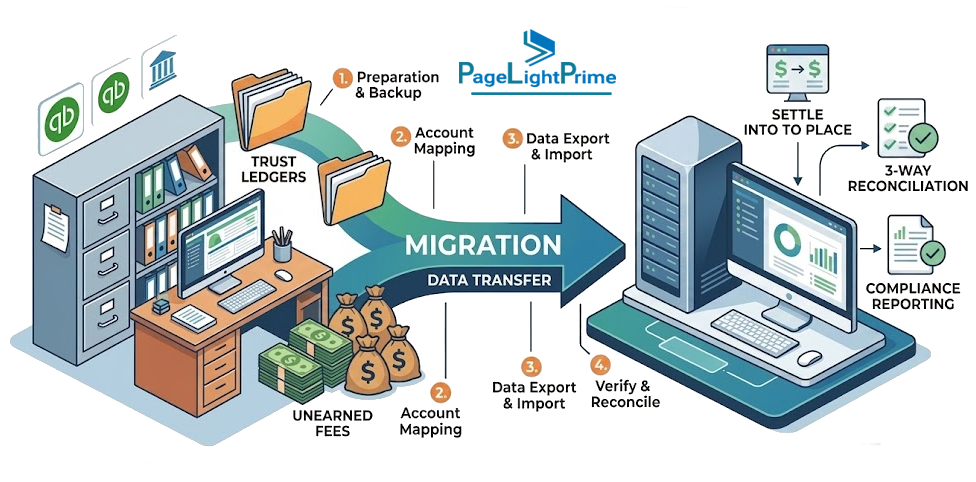
Step-by-Step Law Firm Accounting Migration Flow
Most successful law firm accounting migrations follow a structured sequence designed to reduce trust accounting risk, minimize billing disruption, and simplify post-migration reconciliation
A standardized migration flow typically includes:
- Data cleanup and validation
- Trust/IOLTA reconciliation
- Accounts receivable freeze and review
- Export of active clients and matters
- Opening balance setup in the new platform
- Billing and timekeeping cut-over
- Post-migration testing and validation
Following a structured migration sequence helps reduce reconciliation errors and creates a cleaner separation between historical accounting records and ongoing operational workflows.

QuickBooks Online vs Legal-Specific Platforms
Most law firms moving off QuickBooks follow one of two operational models.
Option 1: QuickBooks-Centered Stack
In this model, QuickBooks Online remains the accounting system and financial source of truth, while legal billing or practice management tools integrate into the workflow.
This approach works well for firms that:
- Already understand QuickBooks
- Want cloud-based accounting access
- Need stronger legal billing workflows
- Prefer gradual operational change
Many firms evaluating law firm trust accounting software still maintain QuickBooks Online as the accounting backend.
Many law firms use QuickBooks Online for general ledger accounting while managing billing and trust accounting inside legal-specific platforms.

Option 2: Legal Platform-Centered Operations
In this model, the legal platform becomes the firm’s operational hub for daily workflows such as:
- Timekeeping
- Billing
- Matter management
- Trust accounting
- Expense tracking
- Client reporting
QuickBooks Online may still operate behind the scenes for general ledger accounting and financial reporting, but the firm’s day-to-day work primarily occurs inside the legal platform.

For firms with complex trust accounting or heavy matter-based billing, this is often the more scalable long-term structure.
Many firms evaluating legal billing software with trust accounting capabilities prefer this model because it centralizes billing, retainers, matter management, and trust reconciliation workflows inside a single operational system.
Unlike generic accounting systems, PageLightPrime was designed specifically for legal financial workflows including trust accounting, matter-based billing, LEDES billing support, retainers, and legal financial reporting.
This approach can reduce reconciliation complexity, eliminate disconnected workflows, and improve visibility across trust accounting, billing, and matter-level financial operations. Unlike general accounting systems, legal-specific financial platforms are structured around client matters, retainers, trust liabilities, and legal billing workflows from the start.

Should You Migrate to QuickBooks Online or Replace QuickBooks Entirely?
One of the biggest decisions during a law firm accounting migration is whether to continue using QuickBooks Online as the accounting backbone or move daily operations into a legal-specific financial platform.
For some firms, QuickBooks Online combined with legal integrations provides sufficient flexibility while minimizing operational disruption.
For other firms — especially those with complex retainers, high transaction volumes, or detailed matter-based billing — a legal-specific platform often provides stronger long-term scalability.

The right approach usually depends on:
- The complexity of trust accounting workflows
- Billing volume and staffing structure
- Multi-office or multi-entity requirements
- Reporting requirements
- Integration needs
- Internal accounting expertise
Firms with sophisticated legal accounting workflows often prioritize operational efficiency and trust accounting accuracy over preserving legacy bookkeeping processes.

Simple Law Firm Migration Checklist
Pre-Migration
- Reconcile all bank accounts, trust accounts, and the trial balance
- Clean up duplicates, inactive clients, old matters, and unapplied cash
- Decide the cut-over date, ideally at month-end
- Export active clients, matters, vendors, and open invoices
Migration and Cut-Over
- Set up opening balances in the new system
- Verify trust/IOLTA balances by client or matter
- Test one sample client from time entry through payment
Post-Migration
- Train staff on the new billing and trust workflow
- Run both systems briefly if needed, then retire the old file
- Keep the old QuickBooks file as the historical archive

The Three Most Critical Areas in a Law Firm Migration
For law firms, trust accounting should always be the highest priority during migration, followed closely by open accounts receivable and matter-level billing accuracy.
The three areas that matter most are:
- Trust/IOLTA balances
- Open A/R
- Matter-based billing workflows
If those three components transfer correctly and reconcile accurately, the migration is usually on solid footing.
Many firms discover that validated trust balances and structured opening balances create a far smoother transition than attempting a full historical migration.

“
A Simpler Migration Is Usually a Safer One
The safest law firm migrations are usually the simplest ones.
Rather than attempting to recreate years of accounting history, most firms benefit from:
- Cleaning existing data first
- Migrating only active operational records
- Establishing accurate opening balances
- Using a structured cut-over date
- Keeping the old QuickBooks file as the historical archive
For law firms specifically, trust accounting accuracy matters more than preserving every historical transaction.
If the trust balances, A/R, and matter records migrate correctly, the rest of the transition becomes significantly easier.
Many firms moving away from QuickBooks eventually adopt unified legal financial systems that combine accounting, billing, trust management, and matter-based financial workflows into a single operational platform such as PageLightPrime Legal Accounting Software.
In most successful law firm migrations, simplicity wins. Firms that prioritize trust accounting accuracy, validated opening balances, and operational continuity tend to experience fewer reconciliation issues and a faster transition for staff. The less complexity introduced at cut-over, the more stable the system becomes on day one.

“
FAQ: Frequently Asked Questions About Sage Timeslips Alternatives
How long does a law firm accounting migration take?
The timeline for a law firm accounting migration depends on firm size, data quality, and trust/billing complexity.
On average:
- Small firms (1–5 attorneys): 2–6 weeks
- Mid-sized firms (5–25 attorneys): 6–12 weeks
- Larger or multi-office firms: 3–6 months
Most of the effort is not system setup—it is:
- Cleaning legacy data
- Reconciling trust accounts
- Validating open accounts receivable
- Standardizing matter and billing structures
- Testing workflows before go-live
Firms with clean QuickBooks files typically migrate faster, while firms with long-standing inconsistencies require more extensive preparation.
Should law firms keep QuickBooks after migration?
In most cases, yes—at least as a historical archive.
After migration, many firms retain QuickBooks for:
- Historical financial records
- Prior-year reporting and audits
- Archived invoices and reconciliations
- Tax and compliance reference
However, QuickBooks should generally be retired from active operations once:
- Open invoices and trust balances are fully migrated
- The first full billing cycle is completed in the new system
- Staff are fully operating in the new platform
Running both systems long-term can create duplication risks and confusion around financial “source of truth.”
How do you migrate a law firm off QuickBooks?
A law firm migration typically includes:
- Cleaning accounting data
- Reconciling trust/IOLTA balances
- Validating open accounts receivable
- Exporting active clients and matters
- Loading opening balances into the new system
- Performing a structured billing cut-over
The safest migrations focus on operational continuity rather than recreating full historical accounting data.
Why is migrating a law firm off QuickBooks more complicated than a standard accounting migration?
Law firms manage trust/IOLTA funds, matter-based billing, retainers, and client liability balances that require specialized handling.
Unlike standard businesses, law firms must:
- Maintain trust as client liabilities tied to matters
- Ensure billing aligns with matter structures
- Reconcile trust and operating accounts continuously
These requirements make legal accounting migrations significantly more complex than standard bookkeeping transitions.
What should be migrated from QuickBooks into a new legal accounting platform?
Most successful migrations include only active operational data:
- Active clients
- Active matters
- Open invoices
- Accounts receivable balances
- Trust/IOLTA balances
- Billing rates and user permissions
- Vendors and expense categories
Many firms intentionally leave:
- Closed matters
- Historical invoices
- Old reconciliations
inside QuickBooks as a historical system of record.
Should historical invoices be migrated?
Usually, no.
Most firms retain QuickBooks as the historical archive and migrate only active operational records and current balances.
Migrating historical transactions often:
- Increases complexity
- Creates reconciliation risk
- Extends migration timelines unnecessarily
How do you migrate trust/IOLTA accounts correctly?
Trust accounts must be fully reconciled before migration.
Firms should validate:
- Client-level trust balances
- Trust liability totals
- Unapplied trust transactions
- Negative trust balances
- Bank-to-trust reconciliation accuracy
Trust balances must be migrated as liabilities—not revenue—to preserve compliance and reporting integrity.
What happens if trust accounting is migrated incorrectly?
Incorrect trust migration can result in:
- Reconciliation failures
- Incorrect client trust balances
- Compliance exposure
- Billing disruptions
- Reporting inconsistencies
Most issues are discovered during the first post-migration reconciliation cycle.
When should a law firm cut over to the new accounting system?
Most firms cut over at month-end or after completing a billing cycle.
This ensures:
- Clean separation of historical vs new activity
- Easier reconciliation
- Reduced billing confusion
Running dual systems for extended periods is generally discouraged due to operational risk.
What are the most common law firm migration mistakes?
Common mistakes include:
- Migrating unreconciled trust balances
- Carrying over duplicate or inactive matters
- Not freezing accounts receivable before cut-over
- Importing unnecessary historical transactions
- Failing to validate opening balances
- Running dual systems too long
- Skipping post-migration workflow testing
Simpler, validated migrations consistently produce better outcomes.
Should a law firm move to QuickBooks Online or a legal-specific platform?
It depends on operational complexity.
Some firms continue with QuickBooks Online plus legal integrations, while others move to legal-specific platforms that combine:
- Legal accounting
- Billing
- Trust accounting
- Matter management
- Financial reporting
Firms with high trust complexity and matter-based billing often benefit from unified legal financial systems.
What is the safest approach to a law firm accounting migration?
The safest approach typically includes:
- Cleaning data before migration
- Reconciling trust and A/R first
- Migrating only active operational records
- Using validated opening balances
- Performing a structured cut-over
- Keeping QuickBooks as a historical archive
For most firms, operational accuracy is more important than preserving full historical transaction detail.