
AI Legal Document Management with SharePoint: How PageLightPrime Automates Legal Workflows
Law firms are moving beyond traditional document storage toward AI-powered legal document management. Lawyers increasingly expect to search large collections of documents, summarize information, identify relevant precedents, draft documents, review contracts, and automate repetitive workflows.
But AI is only as useful as the information it can securely access.
Legal documents need to be organized around matters, clients, permissions, metadata, retention requirements, and established workflows before AI can reliably work with them.
Written by Knowledge Team, posted on August 26, 2026

PageLightPrime combines Microsoft 365 and SharePoint Online with legal-specific document management, matter management, workflow automation, and practice-management capabilities to create an AI-ready environment for law firms.
Instead of replacing Microsoft 365, PageLightPrime builds on the Microsoft ecosystem that firms already use for Word, Outlook, Teams, SharePoint, and identity management.
The result is a legal document management architecture designed to connect documents, emails, matters, workflows, and AI in one governed environment.
Who Should Read This Guide?
- Law firms evaluating SharePoint as a legal DMS
- Firms migrating from NetDocuments, iManage, or DocsVault
- Legal operations teams preparing their organizations for Microsoft 365 Copilot adoption in law firms.
- IT leaders seeking AI-ready governance frameworks
In Brief
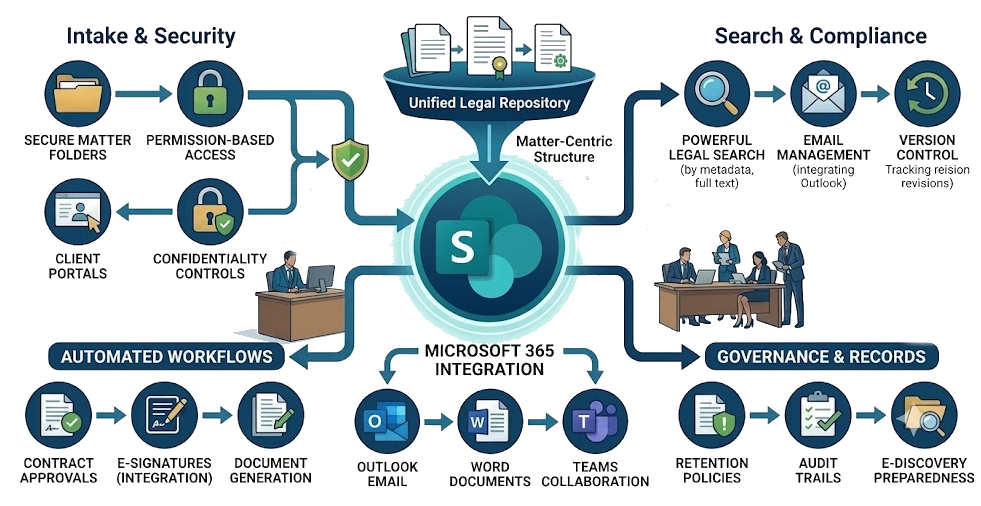
PageLightPrime turns Microsoft 365 and SharePoint Online into a matter-centric legal document management environment designed for AI-powered workflows
SharePoint provides the underlying document platform, while PageLightPrime adds legal-specific capabilities such as:
- Matter-centric document management
- Legal email management
- Legal metadata and classification
- Advanced document and matter search
- Law firm document automation
- Workflow automation
- Matter-based access controls
- Legal practice management
- Billing and accounting
- Trust accounting
- Microsoft 365 integration
This structure gives law firms a foundation for using AI for legal search, drafting, summarization, document review, and workflow automation while maintaining the governance required for legal information.
What Is AI-Powered Legal Document Management?
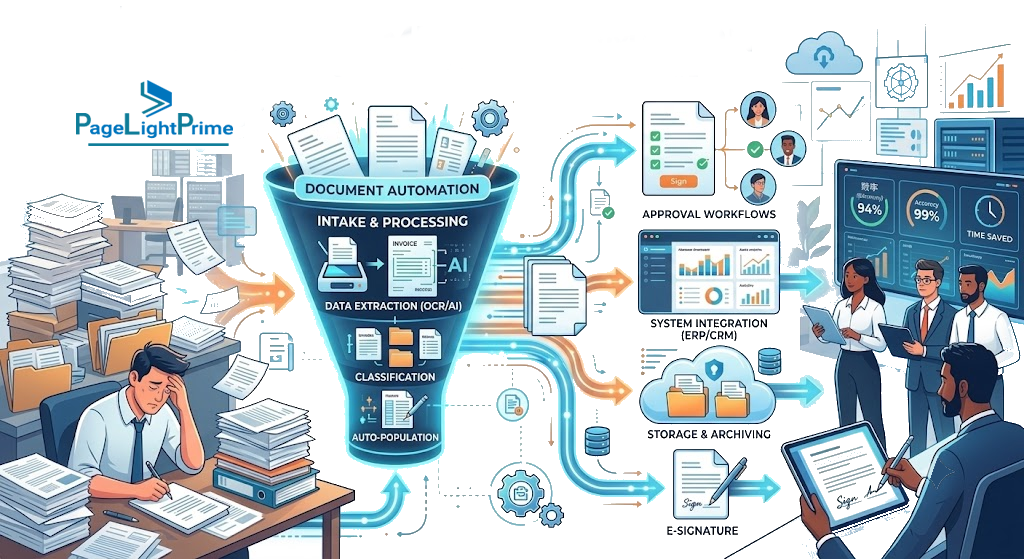
AI-powered legal document management combines traditional document management capabilities with artificial intelligence.
Traditional legal DMS capabilities include:
- Document storage
- Version control
- Metadata
- Search
- Permissions
- Retention
- Audit trails
- Matter organization

AI adds capabilities such as:
- Natural-language search
- Document classification
- Summarization
- Information extraction
- Document comparison
- Drafting assistance
- Contract analysis
- Workflow recommendations
- Knowledge discovery
For law firms, however, simply adding an AI chatbot to a document repository is not enough.
AI needs access to the right documents, the right matter context, and the right permissions.
That makes the underlying information architecture critically important.
Why Traditional Legal DMS Workflows Are Changing
Many traditional document management systems were designed around document storage, filing, version control, and governance.
Those capabilities remain important. But modern legal teams increasingly expect their DMS to work alongside AI-powered applications.
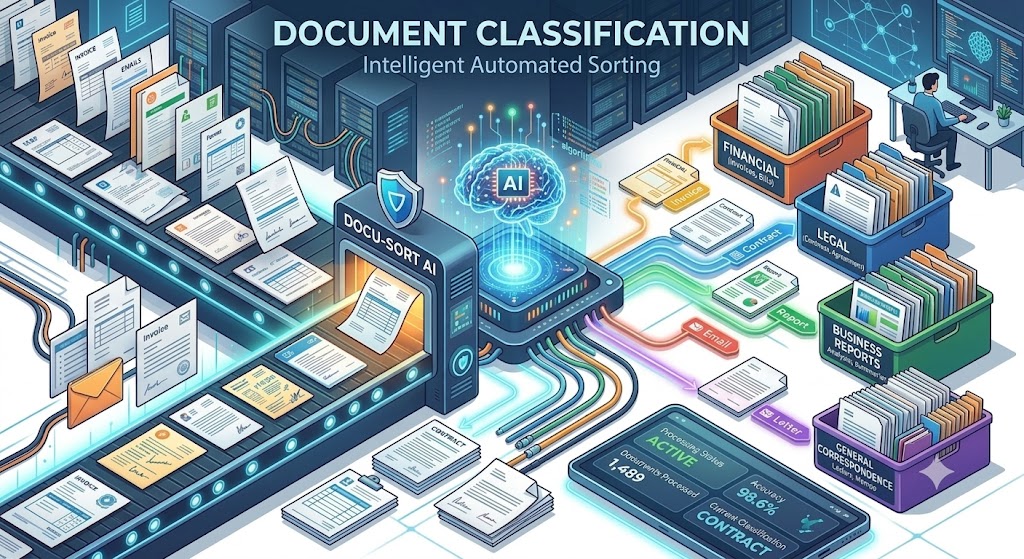
A modern legal document workflow may involve:
- An email arriving in Outlook.
- The email being associated with a client or matter.
- Attachments being stored with the matter’s documents.
- Metadata being applied automatically or through workflow.
- An attorney searching the matter’s documents using natural language.
- AI assisting with summarization or document analysis.
- An attorney reviewing and validating the AI-generated output.
- The final document being stored with the appropriate version, permissions, and audit history.
The challenge is connecting these steps without creating another collection of disconnected systems.

How PageLightPrime + SharePoint Create an AI-Ready Legal DMS
PageLightPrime uses SharePoint Online as the document-management foundation and adds legal-specific functionality around it.
This creates a layered architecture:
| Layer | Technology / Capability |
|---|---|
| Productivity platform | Microsoft 365 |
| Document repository | SharePoint Online |
| Legal DMS | PageLightPrime |
| Matter management | PageLightPrime |
| Legal metadata | SharePoint + PageLightPrime |
| Workflow automation | PageLightPrime + Microsoft Power Automate |
| Identity | Microsoft Entra ID |
| Collaboration | Microsoft Teams |
| Document editing | Microsoft Word |
| Microsoft Outlook | |
| AI ecosystem | Microsoft 365 Copilot and supported AI workflows | Compliance and governance | Microsoft 365, SharePoint and PageLightPrime capabilities | Practice management | PageLightPrime |
Microsoft’s SharePoint AI capabilities, for example, respect the user’s existing permissions when retrieving information. Microsoft Learn
1. Matter-Centric Legal Document Management
A legal document is rarely useful in isolation.
Its meaning usually depends on:
- Client
- Matter
- Practice area
- Attorneys
- Jurisdiction
- Document type
- Date
- Status
- Confidentiality
- Related correspondence
- Related documents
PageLightPrime organizes documents around the legal matter, rather than treating SharePoint simply as a collection of folders and files.

A matter can provide the context for documents, emails, workflows, tasks, and other legal information.
This matter-centric structure is particularly important for AI because it gives search and analysis workflows additional context.
Instead of asking:
“Find documents containing indemnification.”
a lawyer can work within a matter context and ask questions such as:
“Find the indemnification provisions in the contracts for this matter.”
The difference is not merely search technology. It is information architecture.

2. AI-Powered Legal Search
Finding information is one of the most important use cases for AI in legal work.
PageLightPrime builds on SharePoint’s document platform and adds legal context through matter organization, metadata, and workflows.
A legal search experience can combine:
- Full-text document search
- Document metadata
- Matter information
- Document type
- Client information
- Dates
- Permissions
- Email information
- Other matter context

Scanned documents and PDFs can also require OCR and text extraction before their content becomes searchable.
The objective is straightforward:
Help attorneys spend less time locating information and more time analyzing it.
Microsoft is also expanding AI capabilities directly within SharePoint. Current SharePoint Copilot capabilities include asking questions about pages and document libraries, summarizing selected files, comparing files, and using AI to assist with content and workflows. (Microsoft Support)

3. Automated Legal Email Filing
Email is an essential part of most legal matters.
Important information may exist in:
- Client correspondence
- Opposing counsel communications
- Court communications
- Expert communications
- Internal discussions
- Contract negotiations
- Attachments
Manually downloading, naming, categorizing, and filing every email can create unnecessary administrative work.
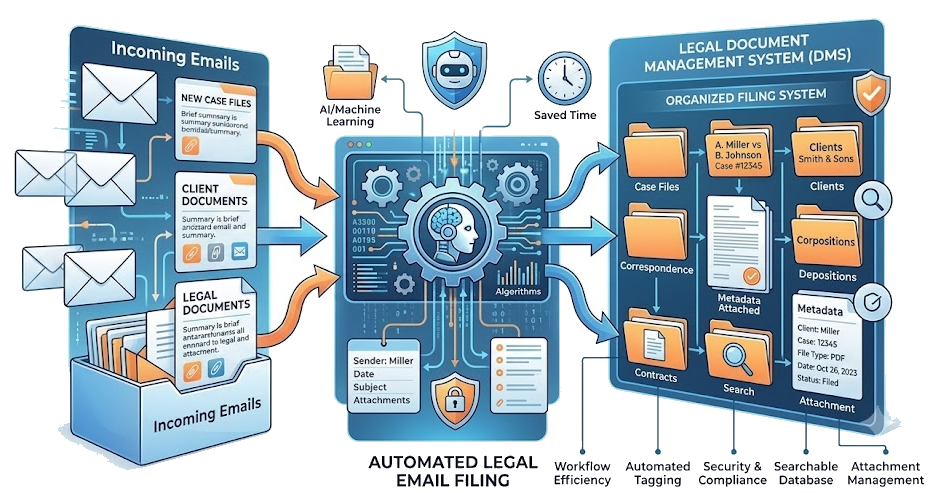
PageLightPrime integrates with Outlook to support legal email management and matter-based filing. Its legal document-management capabilities are designed to connect email and documents within the matter context. (Legal Case Management Software on Microsoft 365)
AI and workflow automation can further assist with identifying the likely matter, classification, and filing process.
The goal is not to remove human judgment from sensitive legal workflows.
The goal is to make the correct workflow easier and more consistent.

4. AI-Assisted Legal Drafting
AI can assist attorneys with many parts of the drafting process.
Examples include:
- Creating first drafts
- Summarizing source material
- Comparing clauses
- Identifying missing information
- Reusing approved language
- Extracting matter information
- Reviewing documents against templates
- Preparing drafting instructions
However, AI-generated legal content should always be reviewed by an appropriately qualified attorney.
The value of a legal DMS is that it can provide the document, matter, metadata, and workflow context surrounding that drafting process.
PageLightPrime’s Microsoft 365 architecture also allows legal teams to continue working in familiar applications such as Microsoft Word while keeping documents connected to the legal matter. (Legal Case Management Software)

5. AI-Powered Document Review
Document review is another area where AI can provide significant assistance.
Consider a transaction involving thousands of contracts.
An AI-assisted workflow could help identify:
- Change-of-control provisions
- Assignment restrictions
- Termination rights
- Indemnification clauses
- Governing-law provisions
- Renewal provisions
- Missing clauses
- Unusual language
- Potential inconsistencies

The DMS remains important because the AI analysis needs to be connected to the underlying documents and matter.
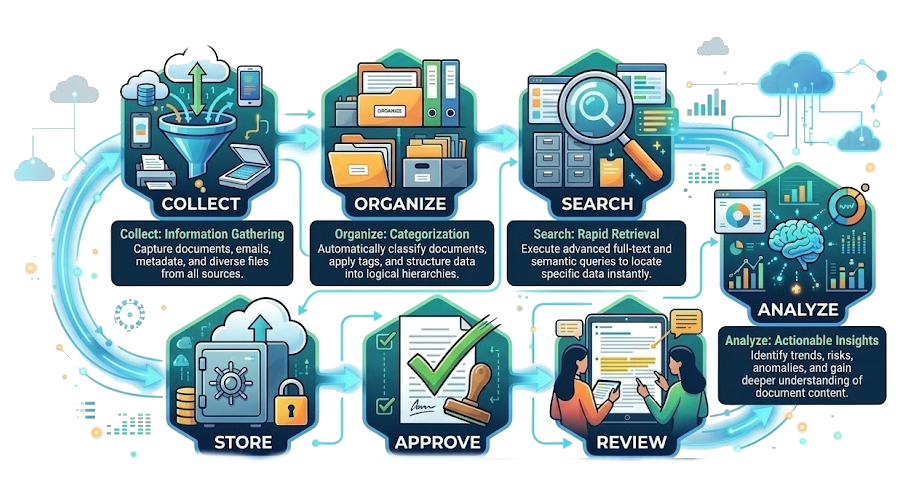
A practical workflow is:
Collect → Organize → Search → Analyze → Review → Approve → Store
AI can assist with the analysis.
Attorneys remain responsible for reviewing and validating the results.
Microsoft similarly cautions that AI-generated output can be incomplete or inaccurate and that users are responsible for reviewing and validating AI-generated content. (Microsoft Support)
6. Workflow Automation for Legal Teams
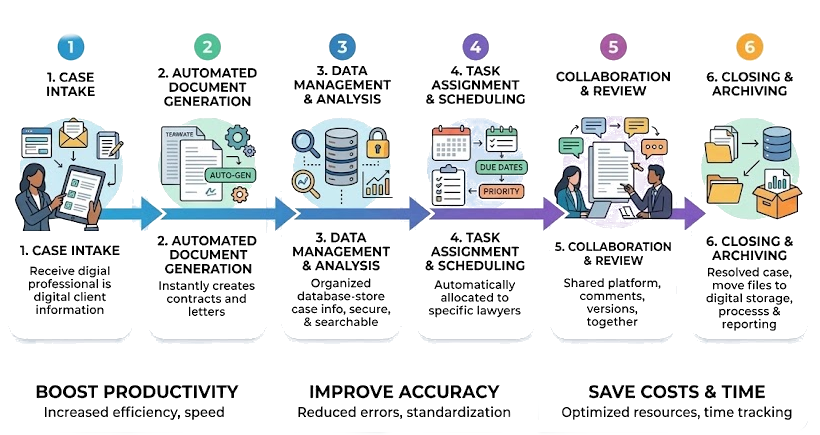
AI becomes more valuable when it is connected to workflows.
For example:
New Matter
→ Create matter workspace
→ Apply metadata
→ Configure access
→ Create document structure
→ Assign responsible attorneys
→ Start intake workflow
Incoming Email
→ Identify matter
→ Capture email
→ Classify content
→ Store in SharePoint
→ Apply metadata
→ Notify responsible user
Contract Review
→ Upload documents
→ Extract information
→ Identify relevant clauses
→ Route for attorney review
→ Record decisions
→ Store final documents
This is where PageLightPrime goes beyond being simply a document repository.
The platform combines legal information management with workflow and practice-management processes.

How Microsoft 365 Copilot Fits Into an AI Legal DMS
Microsoft 365 is increasingly becoming an AI platform as well as a productivity platform.
SharePoint now includes AI capabilities that can work with pages, document libraries, and selected files. Microsoft documents capabilities such as asking questions about content, summarizing files, comparing documents, creating views, and automating workflows. (Microsoft Support)
For law firms, this makes information governance even more important.
If documents are incorrectly permissioned or broadly shared, AI can potentially surface information to users who have access to that underlying content.
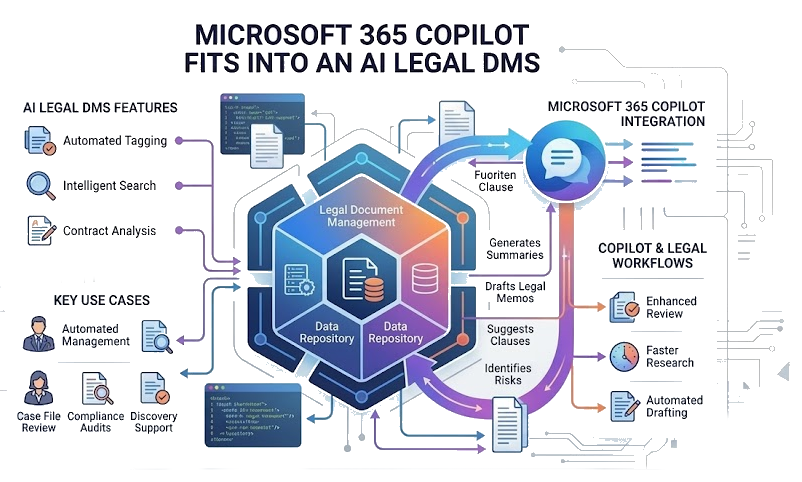
Microsoft’s guidance specifically highlights SharePoint permissions, restricted content discovery, restricted access controls, and governance as important considerations for Microsoft 365 Copilot. (Microsoft Learn)
This reinforces a fundamental principle:
AI governance starts with information governance.
PageLightPrime’s matter-centric architecture helps firms organize legal information around matters, users, documents, and workflows before applying AI to that information.

Legal DMS Governance and Security
Legal information often contains highly confidential and privileged material.
An AI-ready legal DMS therefore needs more than search.
It needs governance.
Important controls include:
Matter-Level Access
Users should only have access to matters and documents appropriate for their role.
Ethical Walls
Restricted matters can require additional access controls to prevent unauthorized users from accessing confidential information.
Metadata
Consistent metadata helps classify documents and support search, workflows, and governance.

Retention
Documents may need to follow firm-specific retention requirements and Microsoft 365 retention capabilities.
Auditability
Organizations may need visibility into document and workflow activity for operational and compliance purposes.
Identity
Microsoft Entra ID provides the identity and access foundation for Microsoft 365 applications.
Microsoft’s current SharePoint AI guidance emphasizes that AI experiences respect users’ permissions to underlying SharePoint data and provides additional controls for restricting content discovery and access. (Microsoft Learn)

PageLightPrime + SharePoint vs. a Traditional Legal DMS
The distinction is not simply between “old” and “new.”
A traditional legal DMS and an AI-ready legal DMS can both provide fundamental document-management capabilities.
The difference is how those capabilities connect with the broader technology environment.
| Capability | Traditional DMS | AI-Ready Microsoft 365 Legal DMS |
|---|---|---|
| Document management | ✓ | ✓ |
| Version control | ✓ | ✓ |
| Matter organization | ✓ | ✓ |
| Metadata | ✓ | ✓ |
| Full-text search | ✓ | ✓ |
| AI-assisted search | Varies | ✓ |
| AI document analysis | Varies | ✓ |
| Microsoft Word | Varies | ✓ |
| Outlook | Varies | ✓ |
| Teams | Varies | ✓ |
| Microsoft 365 identity | Varies | ✓ |
| Workflow automation | Varies | ✓ |
| Microsoft 365 Copilot ecosystem | Varies | ✓ |
| Legal practice management | Varies | ✓ with PageLightPrime |
It builds legal functionality on top of the Microsoft ecosystem.
Can SharePoint Be Used as a Legal DMS?
SharePoint can provide the document-management foundation for a legal DMS, but SharePoint alone is not necessarily a complete legal practice-management platform.
SharePoint provides powerful capabilities for:
- Document libraries
- Permissions
- Version history
- Collaboration
- Metadata
- Search
- Microsoft 365 integration
- Workflow

Law firms, however, may also need:
- Matter management
- Legal email management
- Legal workflows
- Ethical-wall processes
- Document automation
- Legal billing
- Trust accounting
- Practice management
- Legal-specific user experiences
PageLightPrime addresses these requirements by adding a legal application layer to the Microsoft 365 and SharePoint foundation.
This distinction is important.
SharePoint is the platform. PageLightPrime provides the legal application layer.

Example AI Legal Workflows
Litigation
A litigation team can organize pleadings, discovery documents, correspondence, research, and other matter documents within a centralized SharePoint-based matter environment.
AI can then assist with:
- Finding relevant documents
- Summarizing document collections
- Comparing versions
- Identifying relevant information
- Preparing drafting inputs
Attorneys review the resulting work before relying on it.

Corporate Transactions
A corporate legal team working on an acquisition may have thousands of contracts and supporting documents.
An AI-assisted workflow can help:
- Organize the transaction documents.
- Classify documents.
- Search for relevant provisions.
- Extract key information.
- Identify documents requiring attorney attention.
- Summarize findings.
- Route results for review.
The underlying documents remain connected to the matter and its governance framework.

Contract Management
For recurring contracts, AI can assist with:
- Clause identification
- Contract comparison
- Renewal analysis
- Obligation extraction
- Risk identification
- Metadata extraction
- Summary generation
PageLightPrime provides the document and matter-management foundation around these workflows.
Legal Email Management
A small or mid-sized firm may receive thousands of matter-related emails.
A matter-centric email workflow can help users:
- Identify the appropriate matter
- Capture correspondence
- Store emails with related documents
- Apply metadata
- Search email and documents together
- Maintain a consistent filing process
This reduces reliance on manual folder management.

From Traditional DMS to an AI-Ready Legal DMS
Many law firms considering AI are also evaluating whether their existing DMS remains the right foundation.
Migration projects should not focus only on moving files.
A successful legal DMS migration should consider:
- Existing matters
- Client information
- Document metadata
- Folder structures
- User permissions
- Ethical walls
- Retention requirements
- Search
- Workflows
- AI readiness
A metadata-first migration strategy can be particularly important because poorly structured information remains difficult to search and analyze after migration.
For firms evaluating a move from platforms such as NetDocuments or other legacy DMS environments, SharePoint can provide the Microsoft 365 foundation while PageLightPrime provides legal-specific functionality.

How to Implement an AI-Ready Legal DMS
Before implementing AI, law firms should first identify which workflows are worth automating. PageLightPrime’s PASS (PageLightPrime AI Scoring System) provides a structured framework for evaluating legal workflows based on time intensity, manual effort, frequency, standardization, AI/automation fit, and business impact. PASS helps organizations prioritize AI opportunities before moving into risk assessment, economic analysis, technical feasibility, and pilot implementation.
Learn more: PASS: The PageLightPrime AI Scoring System for Prioritizing AI and Automation in Legal Workflows

Step 1: Assess the Existing Environment
Identify:
- Documents
- Matters
- Emails
- Metadata
- Permissions
- Retention requirements
- Existing workflows
- Search limitations
Step 2: Design the Matter Structure
Define how clients, matters, documents, emails, users, and permissions relate to each other.

Step 3: Establish Governance
Configure appropriate:
- Permissions
- Access controls
- Retention
- Sensitivity
- Sharing policies
- Audit requirements
Step 4: Implement PageLightPrime
Configure the legal DMS, matter management, document structures, workflows, and Microsoft 365 integrations.
Step 5: Introduce AI
Start with practical use cases such as:
- Search
- Summarization
- Classification
- Document comparison
- Drafting assistance
- Document review

Step 6: Keep Humans in the Loop
AI should assist legal professionals rather than replace professional judgment.
Step 7: Measure the Results
Measure:
- Search time
- Filing effort
- Workflow completion
- Document retrieval
- User adoption
- Administrative workload

“
The Future of Legal Document Management Is AI-Ready
AI is changing how legal professionals search, draft, analyze, and review information.
But the future of legal technology is not simply about choosing the most powerful AI model.
It is about creating the right foundation for that AI.
- Structured legal information
- Matter-centric organization
- Reliable metadata
- Permission-aware access
- Secure document management
- Workflow automation
- Microsoft 365 integration
- Human review
- Governance
PageLightPrime combines these requirements with Microsoft 365 and SharePoint to create a legal document-management environment designed for modern AI-powered workflows.
For firms already invested in Microsoft 365, this approach provides a way to modernize legal document management without abandoning the applications lawyers already use every day.

“
FAQ: Frequently Asked Questions
Can SharePoint be used as a legal DMS?
Yes. SharePoint can provide the document-management foundation for a legal DMS. However, law firms often require additional legal-specific functionality such as matter management, legal email management, workflows, ethical walls, document automation, billing, and trust accounting.
PageLightPrime provides this legal application layer on top of Microsoft 365 and SharePoint.
How does PageLightPrime use SharePoint?
PageLightPrime uses SharePoint Online as its document-management foundation and adds legal-specific capabilities for matter management, document organization, workflows, search, email management, and legal practice management. PageLightPrime's website describes its SharePoint-based legal DMS and Microsoft 365 integrations. (Legal Practice Management Software)
Can AI search legal documents stored in SharePoint?
Yes, Microsoft is adding AI capabilities to SharePoint that can answer questions about pages and document libraries and perform tasks such as summarization and document comparison. Access to content is governed by the user's permissions. (Microsoft Learn)
PageLightPrime adds legal matter and workflow context around the SharePoint environment.
How does AI protect confidential legal information?
AI does not eliminate the need for information governance.
Law firms should establish appropriate SharePoint permissions, access controls, sharing policies, sensitivity controls, retention policies, and governance before deploying AI.
Microsoft specifically recommends controlling SharePoint access and content discovery when preparing SharePoint and OneDrive content for Microsoft 365 Copilot. (Microsoft Learn)
Does AI replace attorneys in legal drafting or document review?
No.
AI can assist with research, drafting, summarization, classification, and review, but attorneys remain responsible for evaluating the accuracy and suitability of AI-generated results.
Microsoft also advises users to review and validate AI-generated content. (Microsoft Support)
Can PageLightPrime work with Microsoft Word and Outlook?
Yes. PageLightPrime integrates with Microsoft 365 applications including Microsoft Word and Outlook, allowing legal teams to work with documents and email within their existing Microsoft environment
Is PageLightPrime a legal DMS or a practice management platform?
Both.
PageLightPrime combines a SharePoint-based legal document management system with broader legal practice-management capabilities, including matter management, billing, accounting, and trust accounting. (Legal Case Management Software)
Can law firms migrate from a traditional DMS to SharePoint and PageLightPrime?
Yes. A migration can move documents and metadata into a SharePoint-based environment while PageLightPrime provides the legal application layer.
A successful migration should address document structure, metadata, permissions, retention, matters, email, and workflows—not simply copy files from one system to another.
What makes an AI-ready legal DMS different?
An AI-ready legal DMS does more than store documents.
It provides the structured information, permissions, metadata, matter context, and workflows that AI needs to work effectively with legal information.
That is why the underlying DMS architecture matters as much as the AI model.
Ready to Build an AI-Ready Legal DMS?
If your firm is evaluating SharePoint as a legal DMS, replacing a traditional DMS, improving legal document search, or preparing your documents for AI, PageLightPrime can help you design a matter-centric Microsoft 365 environment for modern legal operations.
Explore PageLightPrime or request a demonstration to see how legal document management, matter management, workflow automation, and Microsoft 365 can work together.